




Many teams still have CUBA Platform applications that work well and solve real business tasks every day. But over time, the question becomes unavoidable: should we keep maintaining the application on the old stack, or should we move it to Jmix?
In this article, I want to show what such a migration looks like in practice. We migrated the Timesheets sample application from CUBA Platform to Jmix and recorded the process step by step. This was a good example because Timesheets is not a small demo with just a few entities and CRUD screens. It is a working time tracking application with approvals, multiple ways to enter time, custom UI behavior, calendar, charts, and a fair amount of business logic.
From the start, it was clear that one-click migration is not realistic for a non-trivial project. Our goal was more practical: use AI agents to handle the tedious parts of the work and make the migration faster.
Below I will go through why moving from CUBA Platform to Jmix makes sense, what made this migration difficult, how the process was organized, where AI agents helped the most, and how the final effort compared to the estimates.
Before going into the details, here is the short version: we succeeded with the Timesheets migration and spent about 10 times less effort than expected. Useful links:
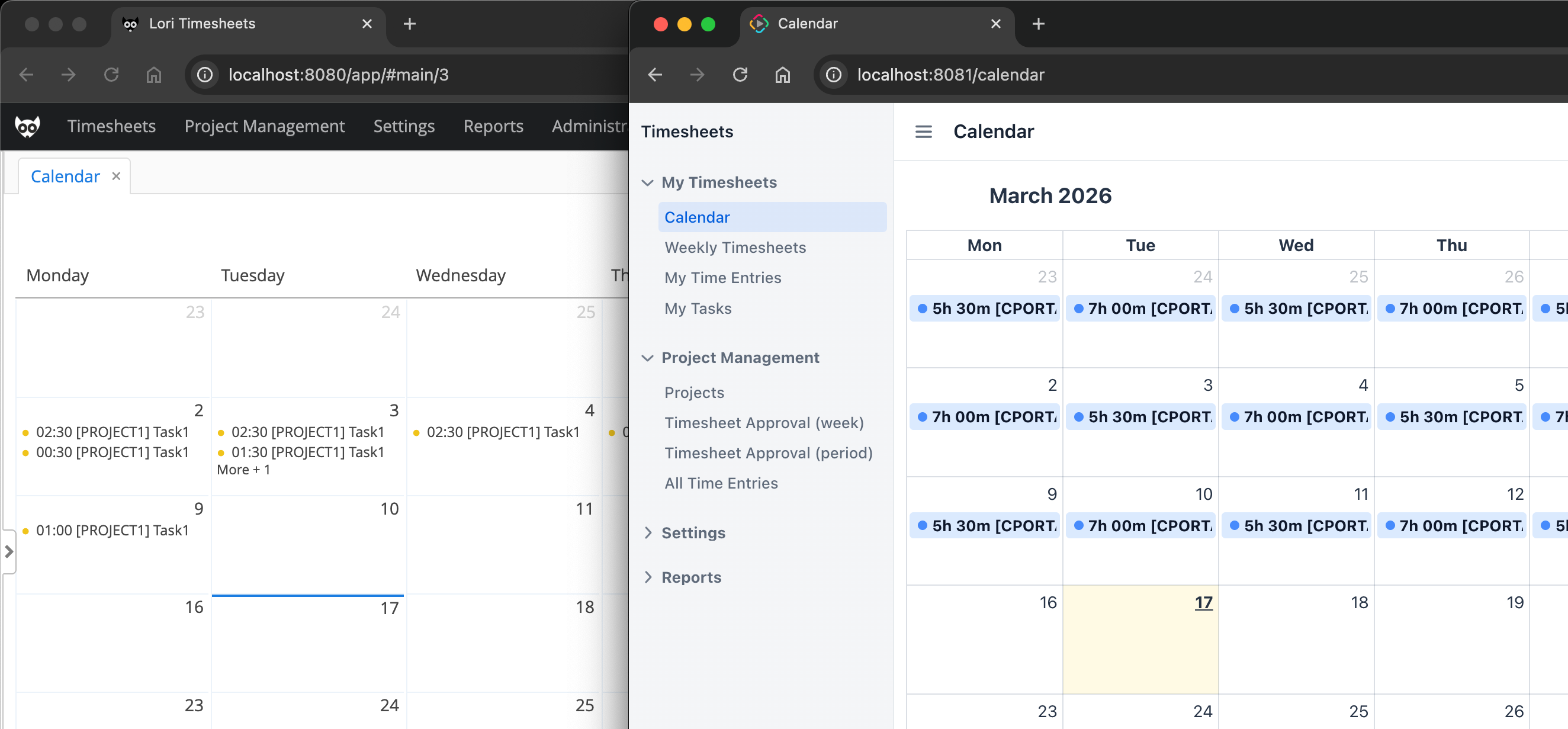
Why move from CUBA Platform to Jmix
For CUBA Platform users, Jmix is the natural next step. It continues the framework line and gives access to the current stack, current APIs, and current tools.
This is the main reason to migrate: at some point, staying on the old platform becomes more expensive than moving forward. Even if the application still works, the team has to keep older framework knowledge and UI patterns. Older dependencies can bring known security vulnerabilities that are harder to fix on an outdated stack. Over time this makes maintenance and further development harder.
At the same time, it is important to be realistic. 6 years passed since we stopped active CUBA Platform development and introduced Jmix. Migration from CUBA Platform to Jmix is not just a package rename. The backend changes are usually manageable, but the UI part is much more demanding. The old CUBA Generic UI and the new Jmix Flow UI are based on same ideas but different APIs, components and layout approaches. So the task is not just to move code, but to rebuild screens and preserve behavior.
That was exactly the case in this migration.
The source project
The source project is a company time tracking system that includes:
- 14 entities, 5 enumerations
- 4 services, 1 entity listener
- 35 screens, 1 frame
- Reports and Charts add-ons
From the user point of view, the application is more than a simple list of time entries. Users can enter time in several ways: through weekly timesheets, a calendar view, and a list of their own time entries. There is also a command line component for fast bulk input, for example entering a command like @Portal #Development 4h30m to fill workdays for a whole week.
The application also supports an approval process. Managers and approvers can review submitted timesheets and approve or reject them. This means that the UI is not only data entry UI. It also contains role-based behavior, validations, summaries, dynamic components, and workflow-related actions.
In terms of code size, the source project had:
- Java: 8062 lines
- XML: 2252 lines
- SQL: 2151 lines
So this is large enough to be realistic, but still compact enough to analyze as one migration story.
What the Migration Advisor predicted
Before looking at the actual work, it is useful to look at the Jmix Migration Advisor estimate.
For this project, the Migration Advisor predicted the total estimate of 315 man-hours, split into the following parts:
- initial migration: 100 hours (a fixed part of the estimate for any project)
- base entities: 16 hours
- legacy listeners: 1 hour
- screens: 198 hours
The screen estimate was the most important part. The tool grouped the screens by complexity like this: 12 trivial, 16 simple, 4 medium, 2 complex, 3 hard.
This estimate is useful not because it predicts the exact final number, but because it shows where the real cost is. In this project, as in many real migrations, screens were expected to take most of the effort.
That expectation turned out to be correct. The main difference was that AI agents changed how this effort was spent.
Why AI agents mattered here
Without AI assistance, this migration would still be possible. But it would be much slower, especially in the UI part.
The reason is simple. Many migration tasks are repetitive, but not trivial. A developer has to compare source and target frameworks, understand the intent of a screen, map components, rewrite event handling, fix lifecycle differences, run the result, check runtime errors, and then adjust again. Doing this screen by screen is time-consuming, boring, and exhausting.
An AI agent can help a lot in this kind of work.
In our case, the agent was used as a practical development tool:
- to migrate entities and fetch plans
- to migrate business logic
- to analyze source screens and make implementation plans for target views
- to generate the first version of Jmix Flow UI screens
- to react to runtime errors and refine the generated code
- to help with repeated conversions of framework patterns
This was not a fully automatic migration. Manual actions were still needed. For example, the target project was created in Jmix Studio, the Liquibase changelog was generated by Studio, some styles were adjusted by hand, and some issues were fixed manually when that was faster and more reliable.
So the best way to describe the process is not “AI did the migration”. A better description is: AI agents made the migration practical. For many teams, this may be the difference between a migration that is postponed and a migration that is actually started.
Development environment setup
The setup was based on the jmix-migration-from-cuba-platform project, which made the process straightforward and repeatable.
The migration workspace contained two projects:
- the source CUBA project under
workspace/source-projects - the target Jmix project under
workspace/target-projects
The target project was created in Jmix Studio with the same base package as the source project. We added the Reports add-on from the start, because the source application used reports. A Git repository was initialized, both projects were opened in IntelliJ IDEA, and the MCP Server was enabled in the IDE so the agent could work with the codebase.
Since we used the OpenAI Codex agent, we renamed the workspace/.claude folder containing agent skills to .codex after cloning the repository.
To give Codex the tools it needed to work with Jmix projects, we added AGENTS.md and the skills from the jmix-agent-guidelines repository to the target project. We also set up JetBrains MCP, Context7 MCP, and Playwright CLI for Codex by following the instructions from that repository.
We started Codex sessions in the root workspace directory so the agent could access both projects. Throughout the migration, we used the GPT-5.3-Codex model with Medium reasoning.
Main migration phases
The migration was done in several phases.
1. Entities and database
We started with entity migration using a very simple prompt: “Migrate all entities”.
The agent migrated all source entity artifacts into the target Jmix project: persistent entities with Jmix annotations, explicit @Id and system fields, enums, DTO entities, localized messages, and the user extension fields moved from ExtUser into User. It also left TODO notes for the remaining manual parts, such as entity listener migration, and validated the result with a successful compileJava run.
After that, a new empty database was manually created for the target application, and a Liquibase changelog was generated in Studio.
This is a good starting point for almost any migration. Once the data model is in place, later phases become more stable.
2. Fetch plans and business logic
The next steps were migration of shared fetch plans and business logic. We did this in separate Codex sessions with prompts “Migrate all shared fetch plans” and “Migrate all business logic”.
The agent converted all shared fetch plans from the CUBA views.xml file into Jmix fetch-plans.xml, mapped standard CUBA views to Jmix equivalents, registered the fetch plans in application.properties, and validated the result with a successful build. It then migrated the main business layer: service beans, helper beans, the entity listener, supporting utility classes, and business-layer messages.
Business logic can usually be migrated almost completely automatically. This is especially true when the project already has automated tests that the agent can use to verify its work.
For larger projects, it is better to split this phase into several steps to avoid LLM context overload. For example, you can divide the work by package with prompts like “Migrate business logic of x.y.z package”, or by class with prompts like “Migrate X, Y and Z services”. It is also better to migrate lower-level classes first, so the target codebase already contains the dependencies needed by higher-level services.
3. UI migration
The UI phase was the main part of the work.
The migration started from smaller reference screens such as holiday, task type, work time settings, and client screens. Then it continued with other reference packages: project, project participant, tag, tag type, task, and activity type. The prompts were like "Migrate all screens of com.haulmont.timesheets.gui.holiday and com.haulmont.timesheets.gui.tasktype packages".
In this first UI wave, the agent created the new list, detail, and lookup views, updated menu and message bundles, and preserved the important behaviors of the original screens, such as dialog-based open actions, lookup support and holiday cache refresh. For the straightforward CRUD screens, this first pass was close to complete. The result was validated with IDE inspections and successful project builds.
After that came the more interesting screens:
- Project browse and edit
- Task and Tag Type edits
- CommandLine fragment
- Calendar, Time Entry and Weekly Timesheets screens
- Approval screens
- Charts
This order made sense. It started with simpler screens, built confidence, and moved gradually to the views where behavior mattered more than layout.
For the more complex UI tasks, we used a plan-first pattern. Instead of asking the agent to generate code immediately, we first asked it to analyze the source screen and produce an implementation plan with a prompt like this: "Analyze MyTimeEntries source screen and make a plan for how to migrate it to the target project".
Only after that did we move to implementation and testing. This worked better than direct conversion because it forced the agent to focus on behavior, layout, and data flow before writing code, and it also gave the developer a chance to review and correct the plan before implementation.
Where the migration became interesting
Below are a few examples that show what the migration of a non-trivial UI looked like in practice. Instead of a smooth sequence of automatic conversions, it was a repeated cycle of analysis, implementation, testing, and correction.
Tag Type editing
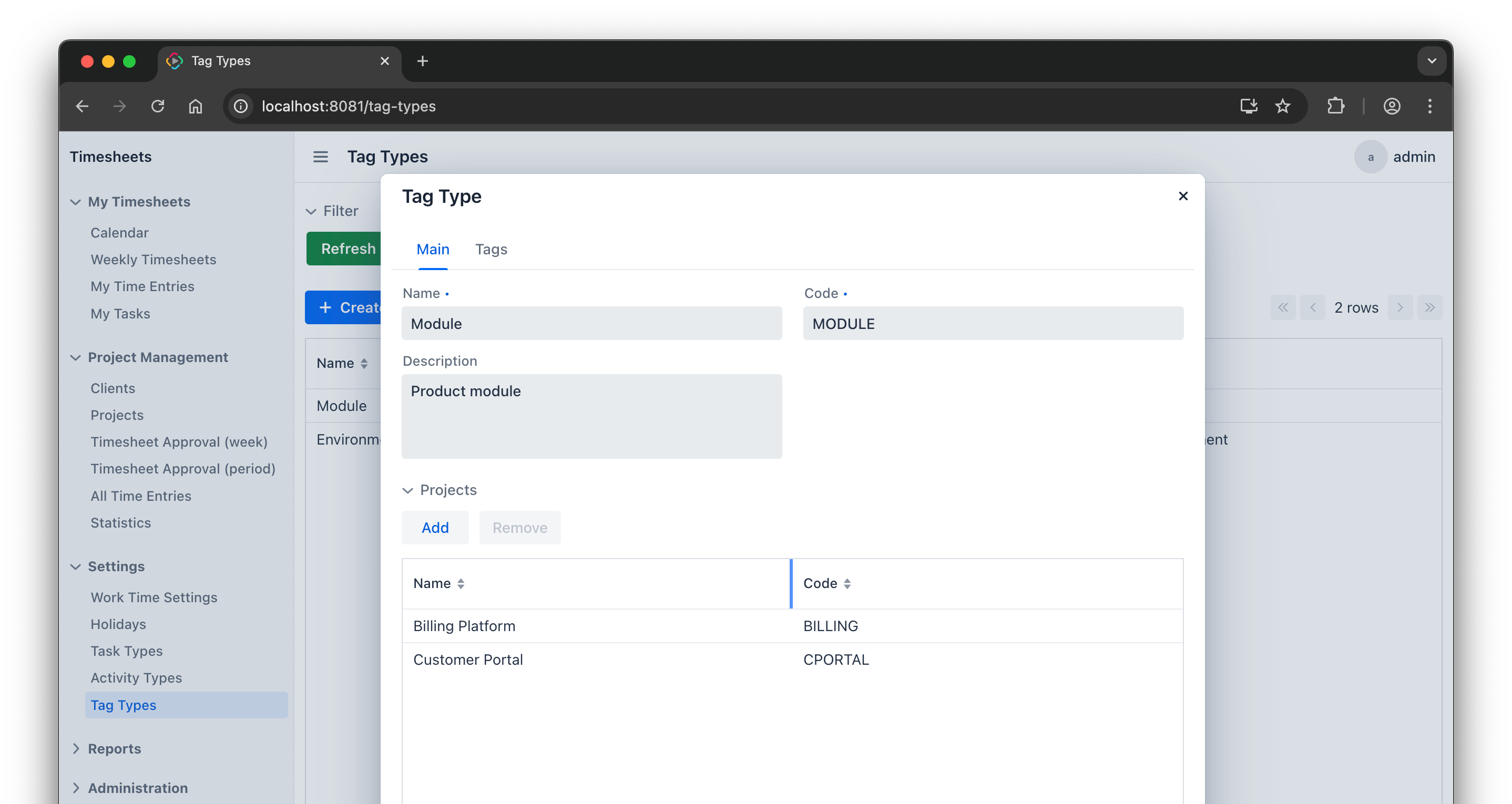
The TagTypeEdit migration looked straightforward at first, but the details showed otherwise. The developer tested the result manually, found problems with adding and removing tags, and asked the agent to fix them.
These are the kinds of issues that make UI migration expensive. The screen may look finished, but the data flow and persistence behavior still need careful adjustment.
Calendar
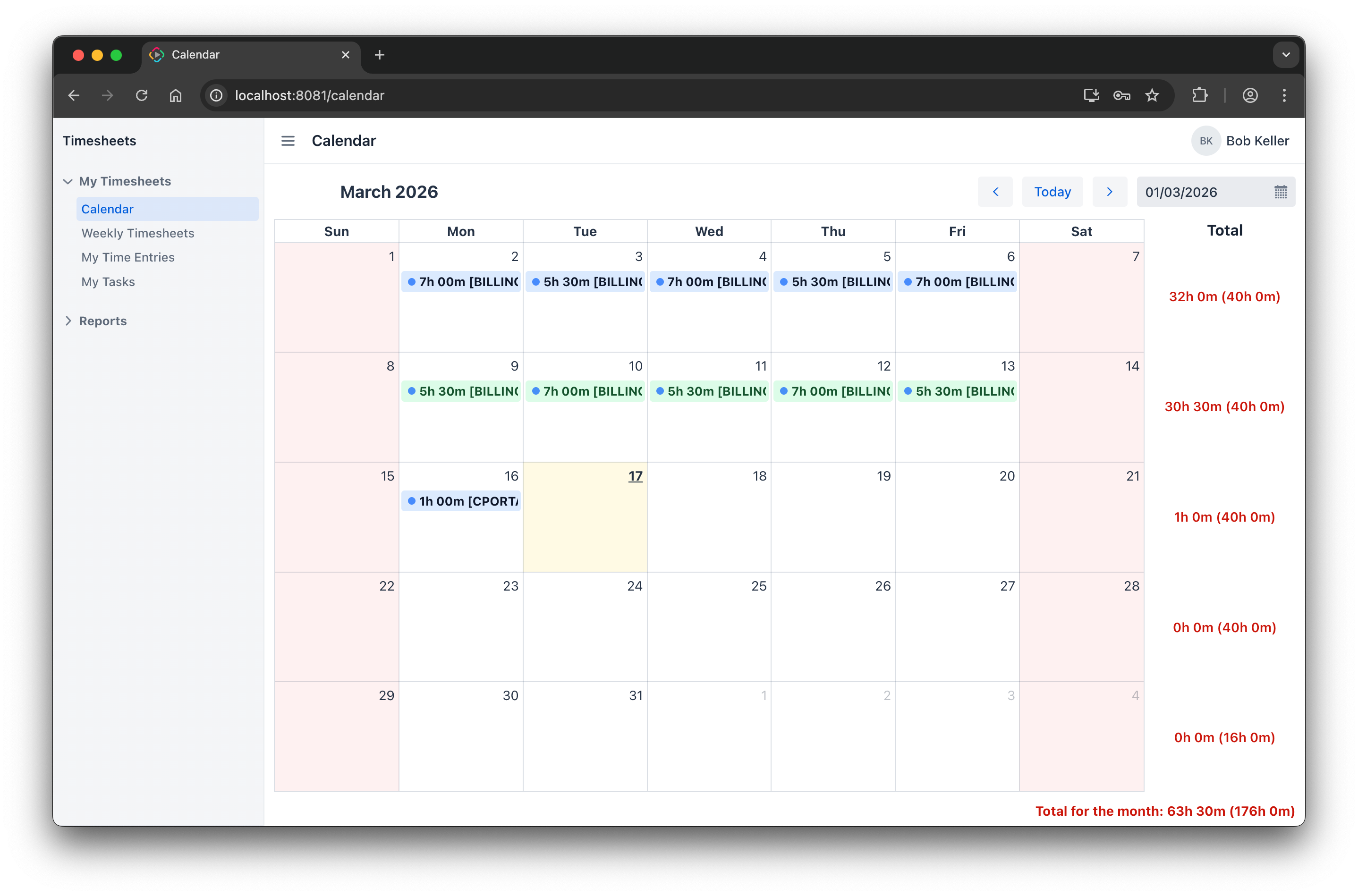
The calendar was one of the more difficult parts. The source implementation had custom layout and custom behavior, and the migration required a design choice even before coding started. It failed to open at first, then needed fixes for drag and drop and totals alignment.
This is a good reminder that migration is not only about matching XML descriptors. When a view has rich behavior, the target screen often needs to be rethought in Jmix terms.
Command line input
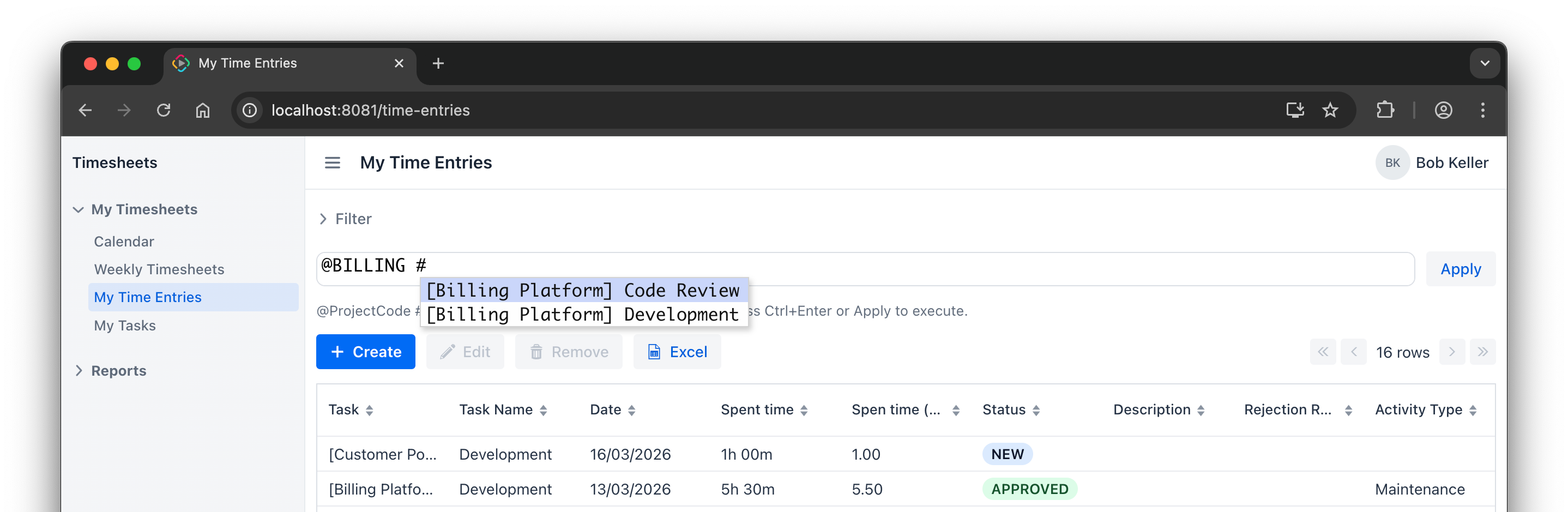
The command line feature was especially interesting because it is a custom usability feature of the application. It allows users to enter time in a compact text form and relies on suggestions for projects and tasks.
The target implementation went through several iterations. The first implementation, invented by the agent, used a ComboBox-based approach. Then the developer asked to rework it with CodeEditor and suggestions. Handling of the Enter key was still inconvenient, so the developer asked the agent to improve it. The results were not good: at different points, pressing Enter created a new line, did not apply the command, or failed because of JSON processing in the editor event. In the end, we gave up on plain Enter and used Ctrl+Enter as the Apply command.
This is a good example of a migration trade-off: sometimes it is too difficult to reproduce exactly the same behavior as in the source application.
Weekly Timesheets
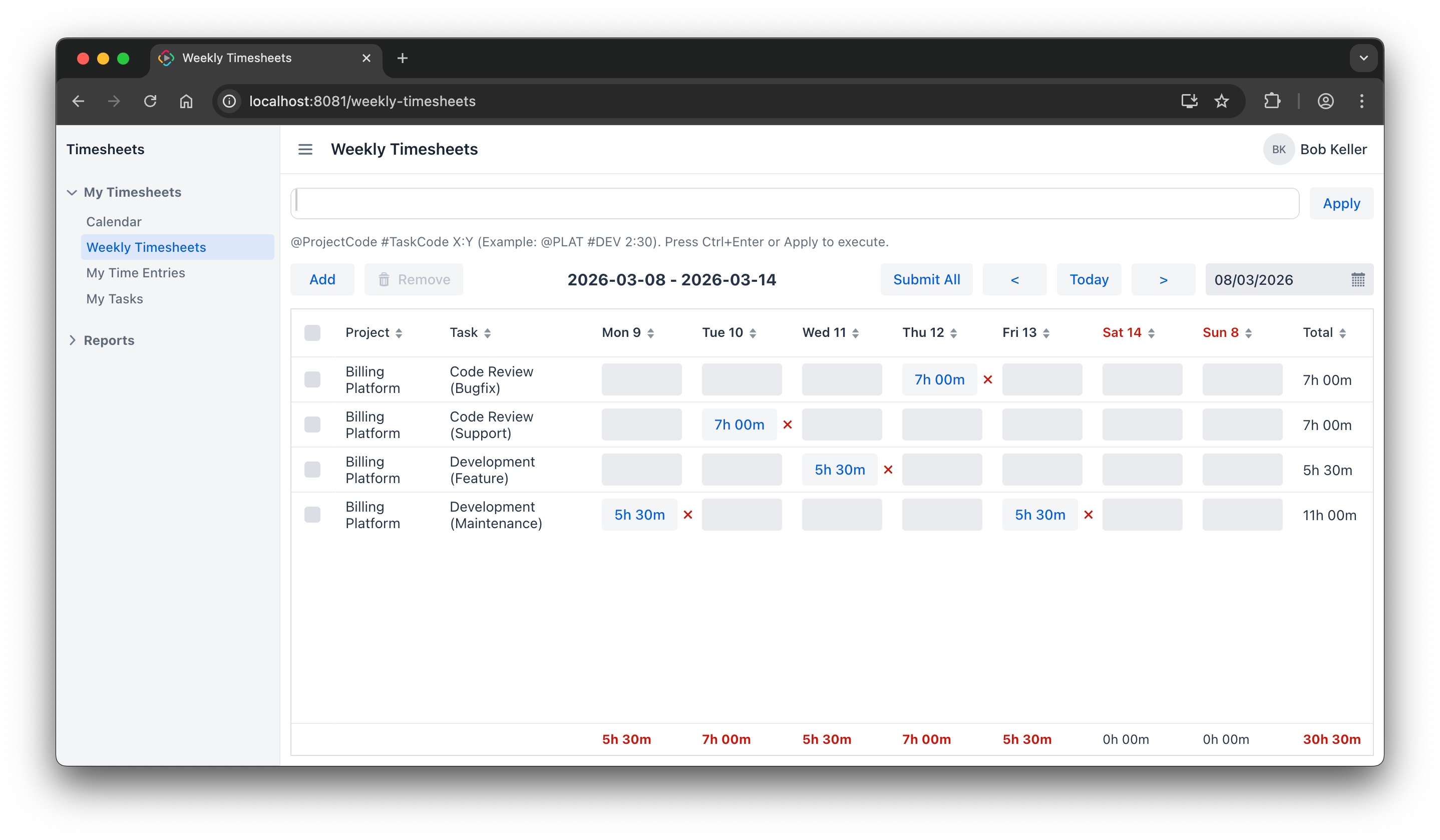
The SimpleWeeklyTimesheets screen was another strong example of hidden complexity. During migration it hit issues with entity IDs, row submission, time parsing edge cases, and focus loss while typing.
One case showed how the agent’s UI test corrected the developer’s assumption. At first it looked like a new row disappeared after clicking Submit All. But Playwright testing showed that the data was not lost. Instead, the new row was merged into an existing row for the same project and task after reload. This is a good example of how an agent with UI testing can sometimes understand the actual system behavior better than a human.
How AI agents simplified the migration in practice
AI agents were most useful for repetitive migration work between CUBA and Jmix: entity transformations, annotation updates, XML changes, and API usage conversions. These tasks are not hard, but there are many of them, and doing them manually is slow and error-prone.
Another useful capability was large-context comparison. The agent could compare the source and target code, spot missing pieces, and suggest what to add. This was especially useful for complex screens, where it could quickly produce a migration plan before implementation.
At the same time, human steering was still necessary. The developer had to decide what behavior really mattered, choose between alternative UX options, and accept or reject ideas proposed by the agent.
So this was not one-shot automation. It was interactive engineering, with many short cycles of prompting, reviewing, testing, fixing, and retesting.
Finishing work: demo data, menu, and security
A real migration is not finished when the project compiles.
In this project, the later stages also included:
- Creating a demo data initializer
- Manually reorganizing the main menu
- Migrating security data from SQL inserts into resource roles
- Manually adding entity and attribute policies that were missing after automatic migration
- Checking permission-based UI behavior
This finishing work matters because it turns the migrated codebase into a usable application.
The migrated application is available in the jmix-timesheets repository.
Final numbers
Now let's compare the total amount of effort with the preliminary expectations.
The Migration Advisor estimated this project at 315 man-hours. Since 100 hours is a fixed baseline for any project, the project-specific estimate is 215 man-hours.
The actual effort spent on this migration was 25 man-hours.
The migrated project ended up with 10916 lines of Java code and 3513 lines of XML. So the target codebase became about 20% larger than the source one. This is not surprising: in many cases, Flow UI views require a different and sometimes more explicit structure than old CUBA screens.
The important point is that the migration effort was far lower than the standard estimate.
Of course, this does not mean every CUBA to Jmix migration will require a similarly small fraction of the estimate. Project structure, custom UI, code quality, and team experience all matter. But this case does show that with a structured process and AI assistance, the practical effort can be reduced very significantly.
Conclusion
This Timesheets migration was a useful test because it included the parts that usually make migrations difficult: many screens, custom UI behavior, dynamic input, calendar, charts, and security details.
The result was encouraging.
The migration was not automatic, and it still needed careful review, testing, and some manual fixes. But with AI agents, the process became much more practical.
For CUBA Platform users, this is probably the main takeaway. Moving to Jmix is still a serious task, but it does not have to be a long rewrite done by hand. With the right setup and a phased workflow, even a UI-heavy application can be migrated in a reasonable amount of time.


