





Rename a Java field and fix its Java usages by hand but miss the old name in a view’s XML descriptor. The project still compiles, and the error appears only when someone opens the view. Studio can flag the broken link before that. Start the rename through the IDE instead, and Java and XML references can change together. Keeping those connections reliable is why Jmix Studio runs inside IntelliJ IDEA.
Jmix is an open-source platform for building enterprise applications in Java. Java handles the business logic, while XML defines the UI layouts. Studio adds code generation and visual designers. The application runs on Spring Boot.
The designers write ordinary project files, and you can also edit those files by hand. When you return to a designer, Studio has to understand what has changed. Both the rename and the designers depend on Studio understanding the project’s code as well as an IDE does. IntelliJ gives Java and XML one code model, PSI (Program Structure Interface), and Studio adds the Jmix-specific links on top of it. That shared model, together with the designers, is what would have to be rebuilt to bring Studio to VS Code or Zed.
How Studio Follows customer.name from XML to Java
Take one such link, customer.name, in this fragment of a Jmix view descriptor, the XML file that defines a view layout and data components.
<data>
  <collection id="ordersDc" class="com.company.demo.entity.Order">
    <!-- loader omitted -->
    <fetchPlan extends="_base">
      <property name="customer">
        <property name="name"/>
      </property>
    </fetchPlan>
  </collection>
</data>

<layout>
  <dataGrid dataContainer="ordersDc">
    <columns>
      <column property="customer.name"/>
    </columns>
  </dataGrid>
</layout>
An XML parser sees elements and string attributes. Jmix uses them to describe how a view gets its data. The grid displays orders from the ordersDc data container. Its customer.name column follows each order’s customer reference to the customer’s name. The fetch plan defines which parts of this data to load from the database. A generic XML tool sees none of this and treats customer.name as an ordinary string.
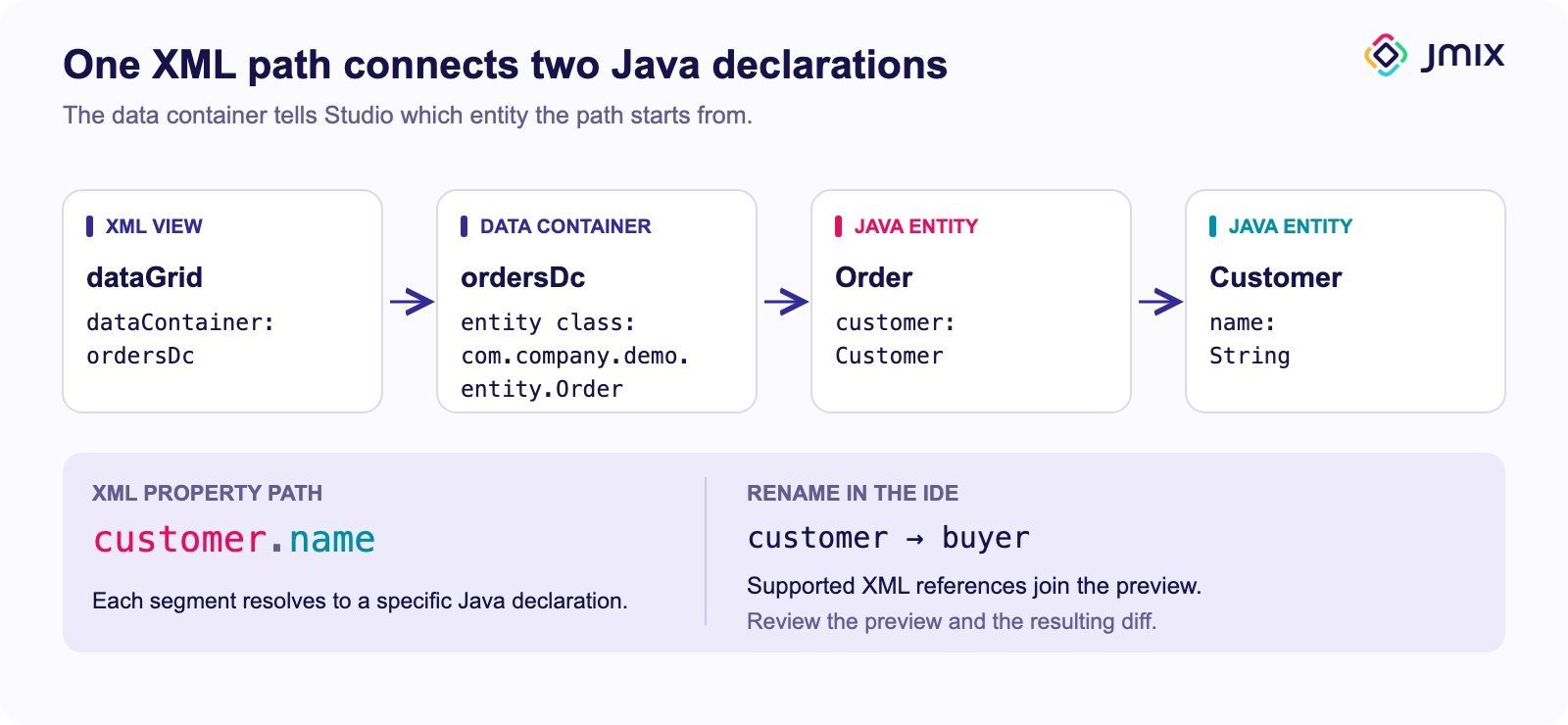
The data container tells Studio which entity the path starts from. Each segment then resolves a Java declaration.
Rename Order.customer to buyer through the IDE. The preview should include Java usages alongside the XML references that Studio supports. Queries, expressions, reports, and external configuration may hold references the refactoring does not cover.



What PSI Provides and What Studio Adds
That rename relies on PSI. The platform builds navigation, inspections, and refactoring on it, and Studio uses the same model for classes, fields, XML nodes, and the links between them.
PSI does not know Jmix rules. Studio has to know that ordersDc holds Order entities before it can follow customer.name from that class. In pseudocode:
// pseudocode, not Studio's source
val path = "customer.name"
var type = entityOf(container("ordersDc"))
for (segment in path.split(".")) {
  val attr = type.attribute(segment)
  if (attr == null)
    return reportUnresolved()
  addReference(segment, attr.declaration)
  type = attr.type
}
if (!fetchPlan.contains(path))
  reportNotFetched()
Each segment gets its own reference, so customer points to the association on Order, and name to the attribute on Customer. Studio must make these references discoverable through usage search. Java rename can then find them and call handleElementRename() on each reference to update its XML segment.
The last check in the pseudocode matters for performance. If the fetch plan leaves out the customer, the grid may run an extra query for each row, the N+1 problem. Studio can warn when a view uses data that its fetch plan does not include.
Could Studio Run in VS Code or Zed?
VS Code is an obvious alternative. You can already write Jmix business logic in it and build it from a terminal. Bringing Studio would mean rebuilding two things outside PSI: the Java/XML analysis shown above and the visual designers.
Renaming across two languages in VS Code
Red Hat’s Java extension analyzes Java with the Eclipse JDT Language Server (JDT LS), a separate process that answers the editor’s questions about Java. Studio integration would have to connect that analysis to Jmix XML, as Studio does with PSI today. An extension can register handlers for navigation and rename:
languages.registerDefinitionProvider("xml", jmixDefinitions)
languages.registerRenameProvider("xml", jmixRename)
In IntelliJ, a Java rename finds Studio’s XML references through usage search, but VS Code hands each rename to a single provider. For a given file, VS Code sorts the rename providers that match it by score, asks them in sequence, and uses the first result, without merging edits. A rename started in a Java file never reaches a provider registered for XML, so that provider cannot add XML edits to a Java rename handled by JDT LS. Returning the Java and XML edits together would take a single provider that understands both languages.
In principle, a Jmix extension could join the Java rename as a participant in Eclipse’s rename refactoring, which JDT LS runs. It would still need Jmix-aware XML analysis and an adapter to return non-Java edits through JDT LS’s change conversion.
Sharing the analysis still leaves editor work
The second route is a separate language server that analyzes Java and XML together and returns both sets of edits from one provider. Spring Tools takes this route, with Java-based language servers running in Eclipse and VS Code. Moving Studio’s analysis onto a different code model would require reworking code that depends on PSI, IntelliJ indexes, or threading rules.
A language server built on IntelliJ itself could avoid that rework. JetBrains now offers Java and Kotlin by IntelliJ IDEA, an LSP-based extension for VS Code and Cursor that reached version 1.0 in October 2026. We have not checked whether it could expose Studio’s Jmix-specific analysis.
Even then, every editor needs separate integration work, so a new XML descriptor attribute would be implemented once in the shared service and again in each editor’s designer. In VS Code the designers would be custom editors and webviews that must stay in sync with the source files, handle undo and save, and follow the editor’s themes and accessibility features.
Zed has no designer API yet
In VS Code the designers would be expensive to build. In Zed they currently have nowhere to run. As of November 2026, Zed’s documented extension features include languages, debuggers, themes, icon themes, snippets, and MCP servers, and the extension guide describes no API for the custom visual editors Studio needs. Proposals exist for a visual extension API and read-only file previews. Until one of them lands, the shared language server described above could bring navigation and diagnostics to Zed, but not the designers.
Agents Can Borrow Studio’s Analysis Through MCP
Coding agents make an editor integration like this cheaper to write, but they do not make its rename and designer behavior reliable. Agent-written Jmix code has a similar problem because it can compile and still break when a view opens. While trying coding agents on Jmix, I saw generated code compile and the application start, only to fail when I opened a view or saved data. Asking the agent to use Studio’s inspections and test the UI helped me find these errors faster. I want agents to use that analysis before handing the code back.
The agent does not have to run in IntelliJ to use that analysis. IntelliJ IDEA has had a built-in MCP server since version 2025.2. MCP, the Model Context Protocol, lets agents call tools in other applications. With the server enabled and the project open in IDEA, an agent in VS Code can check a file for problems, build the project, and run rename refactorings. In the coding-agent post linked above, these checks also returned Studio warnings for broken XML references and fetch plan issues. A developer who stays in VS Code can get part of Studio’s checks this way, while the designers stay in IntelliJ.
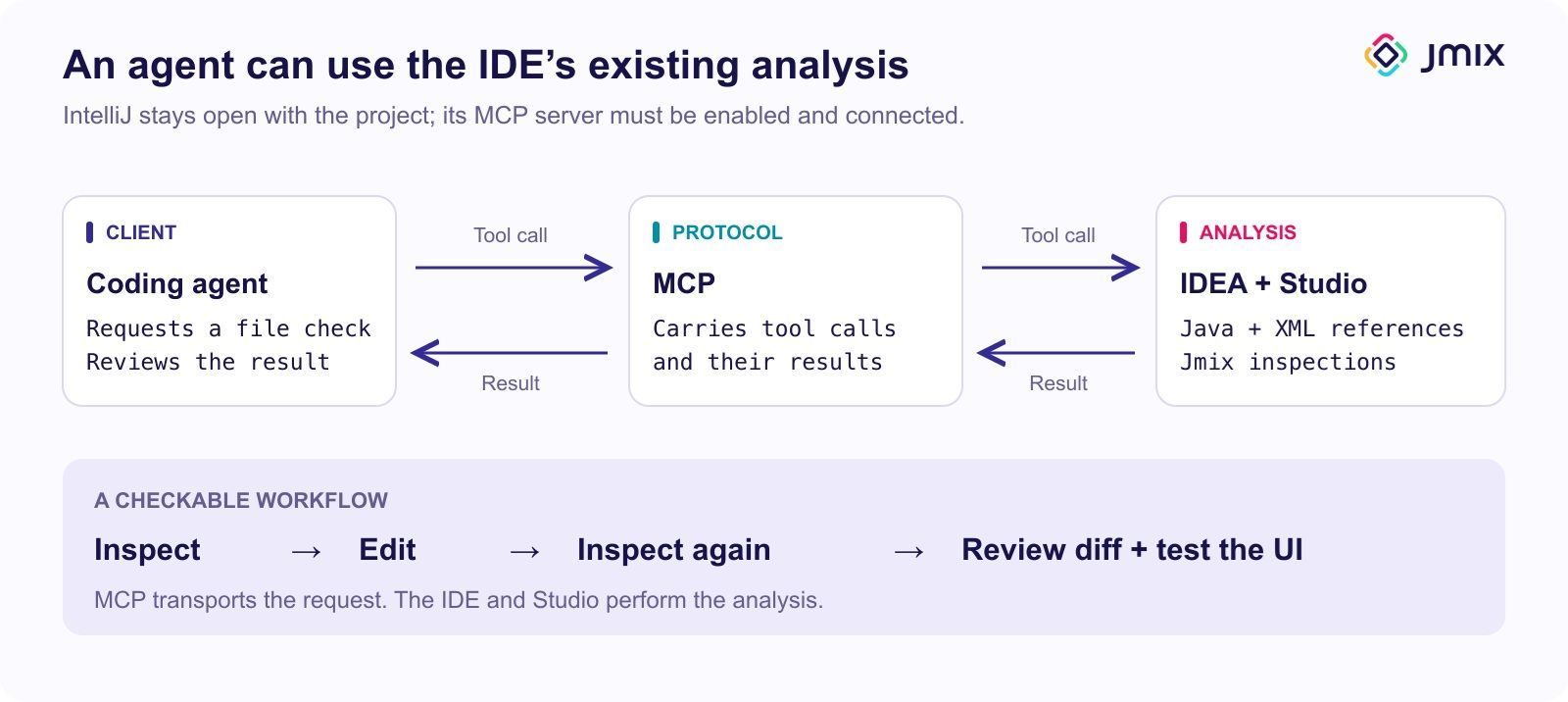
MCP connects the agent to IDE tools. Studio still supplies the Jmix-specific analysis.
Try It on a Branch
Start with a working Jmix project that has an Order → Customer association and a list view that loads orders from the database and displays customer.name. If needed, create Customer.name and the Order.customer association in Studio, generate an Order list view, and configure the column and fetch plan shown above. Populate the list with orders linked to different customers. Open the view to confirm it works, note your Jmix, Studio, and IDEA versions, and work on a Git branch.
- Rename the
customerfield ofOrdertobuyerthrough the IDE. Inspect the refactoring preview, apply the rename, and review thegit difffor supported XML references. - Put the old name back into one column and check whether Studio flags the path in the XML. Then try a path that does not exist.
- Undo the rename and broken-path edits. Set
logging.level.eclipselink.logging.sql=debuginapplication.properties(logging guide), reload the list, and record its SQL as a baseline. - Remove
customerfrom the fetch plan, reload the same page of orders, and compare Studio’s fetch-plan warnings and SQL with the baseline. If the SQL does not change, check whether the instance name ofOrderusescustomer. base includes the attributes used in the instance name, so it may loadcustomeranyway. Restore the fetch plan afterwards. - Optionally, break one XML property path again. Ask an agent to get the file’s problems through MCP, fix the path, and check again. Review the diff and open the view or run a UI integration test that covers it.
./gradlew testalone may not check a descriptor.


What the IntelliJ Choice Costs
Everything in this exercise depends on Studio keeping up with IntelliJ. Each IntelliJ release means checking that Studio works with it, and Studio has to follow the platform’s rules for indexes, PSI access, and UI updates. Whether Studio can run in another IntelliJ-based IDE depends on the modules and API versions it requires.
On the user side, IntelliJ IDEA’s core functionality remains free, and Studio has its own subscription model. Studio’s premium features, including the visual designers, work without a subscription in projects with up to 10 entities and roles (subscription details).
Running inside IntelliJ also ties Studio to one IDE family. For work outside it, Jmix CLI creates a standard project and adds Jmix guidelines and skills for supported coding agents, with no IDE required.
A Jmix application does not depend on Studio to build or run. It uses Java or Kotlin with Spring Boot, XML, and Gradle, so you can build it in CI, run it from a terminal, and edit it in another IDE. Without Studio, teams lose the designers and Jmix-specific refactoring. UI integration tests can catch descriptor errors in CI by opening the affected views and exercising their data bindings, though you get that feedback later than you would from an editor inspection.
Studio pays for the integration by following IntelliJ’s release cycle. In return, a rename of Order.customer can show its Java usages and the supported XML paths in one preview, and the designers don’t have to be rebuilt for every editor.


