



Companies never start with the idea, “Let’s develop our own AI-powered CRM.” It always begins with a business request.
The sales team asks for changes to the pipeline. The customer experience team wants to see churn risk directly in the customer profile instead of in a separate spreadsheet. The finance team wants contracts, invoices, and payment terms connected in one place.
None of these are requests for a chatbot bolted onto a dashboard. Each one is really a request for a system that understands the business well enough to act on its data, not just display it, and that’s a different, much bigger project than picking new CRM software.
Building that kind of system today means working through a series of connected decisions: what the system actually needs to do, whether to buy it or build it, how to architect it so AI can be integrated safely, which technologies to build it on, and how to avoid getting locked into a single vendor along the way.
This article walks through each of those decisions in order. It’s written for CTOs, CIOs, technology directors, architects, CEOs, and product managers evaluating how to build an enterprise B2B CRM for internal use.
Where to start
By now, the pattern is familiar: people across the company keep showing up with their own list of problems. That’s usually a sign that the existing solution — an old CRM system or a collection of spreadsheets — no longer meets the business’s requirements and is starting to limit how it can grow. At some point, the company decides to replace it.
For a CTO, the right response isn’t to react to each request individually. It’s to treat this as the starting point for gathering all functional and non-functional requirements before deciding on a team, a technology stack, or an architecture.
General Requirements
In practice, this comes down to a handful of questions:
- The complexity of the access model. How many roles, permission levels, business units, regions, and data-level restrictions does the system need to support?
- The depth of the business logic. Which business processes need to be automated: approvals, exception handling, escalations, renewals, status calculations, and customer service rules?
- The integration landscape. Which systems does the CRM need to integrate with: an ERP or accounting system, billing, customer support, identity management, an analytical data warehouse, document management, or legacy internal systems?
- Data location and processing requirements. Where must customer data be stored and processed, and are there regulatory, industry, or internal policy constraints on where and how it can be processed?
- Reliability and control requirements. What requirements apply to reporting, auditing, security, change logging, and compliance with internal policies or industry regulations?
- Performance and scale. How many users, records, and transactions does the system need to support today, and how much growth should it be able to absorb over the next several years?
- Architectural flexibility. How much is the business itself likely to change — new products, business units, or regions — and how much of that change does the system need to absorb without a major redesign?
The Role of AI Within a B2B CRM
AI is part of that list too, but it touches nearly every other item on it (the access model, data requirements, reliability and control), so it’s worth walking through on its own.
Enterprise systems accumulate a lot of data, and that data tends to get more complex over time: more entities, more relationships, more reports, more business rules. Even experienced users can find it hard to quickly locate the record, report, or pattern they actually need.
This is where an AI assistant built into the CRM helps. It gives users a controlled interface to that data. Instead of digging through filters, dashboards, and saved views, they can ask a question in plain language, such as finding customers at risk of not renewing, pulling up overdue invoices, or surfacing opportunities linked to unresolved support cases. The answer comes from the application’s own data, not a generic one.
For a CTO, another key question is whether AI can be integrated into the system safely — giving users access to data without constantly relying on analysts and the IT team.
The assistant does not operate as an external chatbot. It works as part of the CRM, taking into account the application data, the user’s permissions, and the business context.
For a CTO, an AI assistant must meet three critical requirements:
A) It must comply with the existing access model.
B) The company must be able to control which data is sent to the model.
C) The assistant must show which sources its answer is based on.
A user must never be able to access data through AI that would not otherwise be available to them through the standard application interface.
An AI-powered CRM therefore cannot be treated as a standard CRM with a chat interface simply added on top. In an enterprise environment, AI functionality must be designed as part of the application architecture.
This is only possible when the CRM architecture is designed for long-term evolution from the outset. The architecture determines how effectively the system can integrate AI, manage data, and scale over time.
At this point, technology leaders face a strategic choice: adapt an off-the-shelf SaaS CRM, or build an internal solution designed around the company’s processes, data requirements, integrations, and security policies from the outset.
When a Custom B2B CRM Becomes the Right Choice
An off-the-shelf CRM system works well when customer processes are sufficiently standardized and closely align with the scenarios already built into the product: standard approaches to sales management, customer communications, reporting, and roles. In these cases, a SaaS CRM is often the fastest and most cost-effective option.
However, the more the CRM needs to reflect a company’s unique operating model, industry-specific requirements, internal approval processes, complex security rules, and dependencies on enterprise systems, the more likely an off-the-shelf solution is to introduce limitations and compromises.
For example, a manufacturing company may need its CRM to show not only customers and opportunities, but also product availability, dealer terms, shipment history, and individual service conditions.
In such cases, the CRM is no longer simply a standard packaged solution. It becomes part of the company’s operational architecture, bringing together customer data, internal processes, integrations, and management decisions.
A custom CRM tends to make sense once specific requirements start pushing a SaaS CRM past what it comfortably handles. Some of those requirements run into an operational ceiling; others are technically possible, but get expensive to keep meeting.
Where a SaaS CRM hits a ceiling:
- Non-standard access permissions. Combining roles, hierarchies, and record-level access rules can model most access scenarios in a standard SaaS CRM, but administering that setup gets harder and slower as it grows, especially past a few hierarchy levels or a few dozen access rules per object. Beyond a certain point, the access model becomes difficult to maintain, not impossible to build.
- Complex business rules. Approvals, discounts, renewals, and escalations that span multiple related records, depend on dynamic reassignment, or react to external triggers typically require custom code rather than a platform’s built-in workflow tools.
Where the cost adds up:
- Strict data and auditing requirements. Change history and audit logging in a standard SaaS CRM usually cover a limited set of fields and a limited retention window. Full audit trails and longer retention are typically a separate paid add-on, priced as a percentage of the overall subscription.
- Controlled AI. Governed, permission-aware AI is available in most major SaaS CRMs, but it’s usually billed separately, through some mix of per-user, per-conversation, and consumption-based pricing that stacks quickly as usage grows.
Many of these capabilities can be added to a SaaS CRM through customization. Salesforce, for example, supports custom objects, workflows, and integrations built on top of the core product, and a base enterprise implementation with deep customization and integrations typically runs from $150,000 to $500,000 or more. The same categories that push costs further elsewhere apply here too: full audit trail retention is a separate Shield add-on priced at 10–30% of total Salesforce spend, and permission-aware AI adds further costs on top of the base license. Agentforce, for example, mixes per-conversation charges, per-user add-ons, and consumption credits, often more than one at once for the same rollout. At some point, the cost-effectiveness shifts in favor of a system designed around these requirements from the start.
There’s another risk that’s easy to underestimate: functionality built through customization runs on the vendor’s platform, not yours. If the relationship with that vendor changes (pricing, licensing terms, platform roadmap), that functionality becomes harder to keep, extend, or move elsewhere.
Approaches to Enterprise CRM Development
Once the decision is to build rather than buy, there are two practical paths: a low-code platform, or a custom build using AI-assisted, agentic development. Classic development without AI barely exists anymore for enterprise-level solutions, including B2B CRM; it’s already the default. The question is which path fits.
Low-code platforms sit closer to another flavor of SaaS than to custom development: a proprietary runtime means less control over the code and data model, plus a ceiling on what the visual tooling can express before you need the vendor’s own extensions. AI-assisted development has narrowed the productivity gap that used to justify that trade-off, and low-code license costs tend to compound over the years rather than stay flat. It’s worth running the numbers before assuming low-code is cheaper by default.
A custom build gets that control back: no proprietary runtime, no ceiling, no compounding costs. What it costs instead is discipline. AI works as part of the engineering process here, not as a replacement for it, with the same rules, review, and validation as any other engineering work, inside a reliable harness. Without that discipline, the low-code trade-off doesn’t really disappear, it just resurfaces as technical debt, often faster than building by hand. Used well, though, it’s what lets teams move faster without cutting corners.
B2B CRM Architecture: Modular Monolith, Microservices, and a Hybrid Model
When designing an enterprise CRM, teams typically consider three architectural approaches: a modular monolith, microservices, and a hybrid model.
A modular monolith is a good fit when the CRM is built around a single core, with customer data, opportunities, contracts, activities, roles, reports, and business processes closely interconnected.
This approach is easier to launch and maintain because it involves fewer infrastructure dependencies and makes testing, transaction management, and access control more straightforward.
The main risk is that, without clear internal modularity, the system can become increasingly difficult to change over time. It is therefore important to define clear module boundaries from the outset, even if the application remains a single deployable system.
A microservice architecture is a good fit when different parts of the CRM need to evolve independently, follow different release cycles, be managed by separate teams, handle different workloads, or meet specific data isolation requirements. Integrations, notifications, analytics, event processing, or an AI service can, for example, be implemented as separate services.
The main advantage of this approach is flexibility and the ability to scale individual components independently. The trade-off is higher operational complexity: monitoring, DevOps, network dependencies, API versioning, and data synchronization all become separate engineering concerns.
A hybrid architecture combines the two approaches. The CRM core remains unified, while selected areas are moved into independent services where this is justified by workload, security, integration, or AI requirements.
This model helps keep the system manageable while allowing the architecture to evolve gradually without requiring a major redesign.
CRM Infrastructure: Cloud, Private Environments, and AI
In many enterprise organizations, CRM systems already operate within private or isolated environments. This is not only driven by regulatory requirements. Corporate policies often restrict the transfer of customer data, commercial information, or internal documents to external AI services.
For CTOs, infrastructure decisions are therefore becoming increasingly tied to AI adoption. If a company plans to use only local models, the architecture must support deploying both the CRM and AI within its own environment, without relying on external services. If no such restrictions apply, the company can use publicly hosted models or combine both approaches.
That’s why platform selection needs to look beyond cloud or on-premises support. The CRM should also work with both local and publicly hosted AI models without requiring changes to the application architecture.
This allows companies to switch AI tools as technologies evolve or security requirements change, without having to redesign the application’s business logic.
Choosing a Technology Stack for an AI-Powered CRM
The next question is which technologies to use to build the system. The technology stack for an enterprise CRM with AI should be chosen with long-term ownership and maintenance risks in mind.
A practical assessment starts with three questions:
- Are there enough specialists, both within the company and on the broader job market, to support the chosen stack?
- Does the technology fit into the existing enterprise environment, including authentication, databases, containerization, monitoring, and DevOps processes?
- Does the stack provide the level of control needed for data access, auditing, and integration with both local and publicly hosted AI models?
Java has a long track record with this kind of system. It powers an estimated 90% of Fortune 500 backend systems, and it stays especially entrenched wherever transaction integrity and long-term reliability matter most. Part of that comes down to how well Java handles integration work specifically. Strong multithreading support, a mature library ecosystem, and native ways to bridge into older systems make it a common choice not just for core business logic, but for the integration and event-driven workflows around it too.
A B2B CRM fits that same profile. As described earlier, even a hybrid architecture keeps the core of the system unified, breaking out only specific areas into separate services, and building that core in one language keeps it easier to maintain as it grows.
The same logic holds up in the market, too: Salesforce, the leading CRM platform, runs on Java. Its Apex language is Java-based and executes on the JVM.
That doesn’t mean every other language falls short in the same way:
- C# is a close technical equivalent, built for the same kind of long-lived enterprise systems. It’s often the better choice simply because a company is already a Microsoft shop.
- Python isn’t a great fit for the transactional core itself, but it’s the natural choice for the data processing and AI/ML work that increasingly sits alongside it.
- Go and Rust are built for a different problem entirely: low-level, performance-critical systems programming, not sprawling, business-rule-heavy domain models.
Choosing Java also means choosing an ecosystem, not just a language: Spring for the application framework, PostgreSQL or another relational database, and the same authentication, containerization, and monitoring tools most enterprises already run for their other Java systems. That overlap is what keeps a Java-based CRM from becoming a separate technology island. It fits naturally into an architecture the company already knows how to run.

In practice, though, few teams write a Java enterprise system entirely by hand today, even with AI assistance. Most choose a platform or framework layer on top of Java rather than assembling Spring, security, data access, and UI from scratch for every project. That choice is where vendor lock-in becomes a real consideration.
How to Reduce the Risk of Vendor Lock-In
For a CTO, vendor lock-in is not only about licensing costs. A more important question is how much control the company will have over the system five or ten years from now: whether it can change technology partners, continue developing the product with an internal team, move the CRM to a different infrastructure environment, or adopt new technologies without a costly migration.
Several criteria are worth considering when choosing a platform:
- Application ownership. The company should retain full access to the source code, data model, and business logic.
- Technological independence. Using widely adopted programming languages, open frameworks, and standard technologies makes it easier to hire specialists and continue developing the system.
- Infrastructure flexibility. The CRM should support deployment in a public cloud, private cloud, or the company’s own infrastructure without requiring architectural changes.
- Freedom of AI choice. The platform should not restrict the choice of AI models. The ability to use both local and publicly hosted models allows the company to adapt to changing business and security requirements.
- System handover. Once the project is complete, the internal team should be able to maintain and develop the CRM independently, without remaining dependent on the original technology partner.
Reducing vendor lock-in does not mean giving up ready-made enterprise development platforms. On the contrary, a mature platform can shorten development time and reduce costs while preserving control over the application, data, and architecture. That balance, alongside technology stack, AI adoption, and support for private environments, is what increasingly defines a good enterprise development platform today.
What Is Jmix?
Jmix is an open-source Java platform for enterprise software development with local and public AI models.
The platform can be used to build enterprise CRM systems, internal business applications, industry-specific solutions, process automation systems, administrative portals, and other enterprise applications while maintaining full control over the architecture, source code, and data.
For enterprise CRM development, Jmix brings together a unified technology stack, ready-made enterprise components, and modern AI-assisted development tools.
Instead of building basic functionality from scratch, teams can focus on the application’s business logic: designing the domain model, implementing complex access rules, integrations, business processes, and user scenarios.


The platform does not restrict the choice of architecture, infrastructure, or AI implementation model. Jmix applications can run in a public cloud, private cloud, or isolated enterprise environment, use both local and publicly hosted AI models, and be developed either by an internal team or a technology partner.
This approach helps reduce dependence on technology vendors while preserving the ability to evolve the system over many years.
B2B CRM with AI on Jmix: A Ready-Made Foundation for an Enterprise CRM
After selecting the architecture, technology stack, and development approach, the next question is where to start.
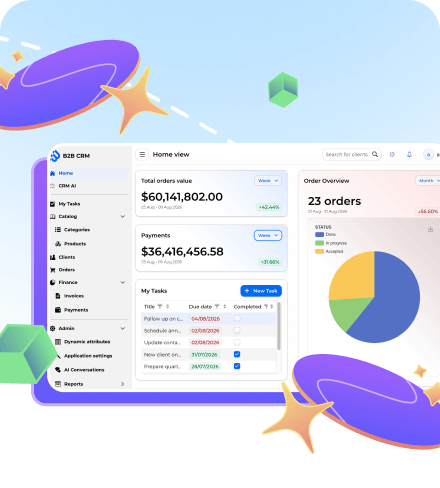
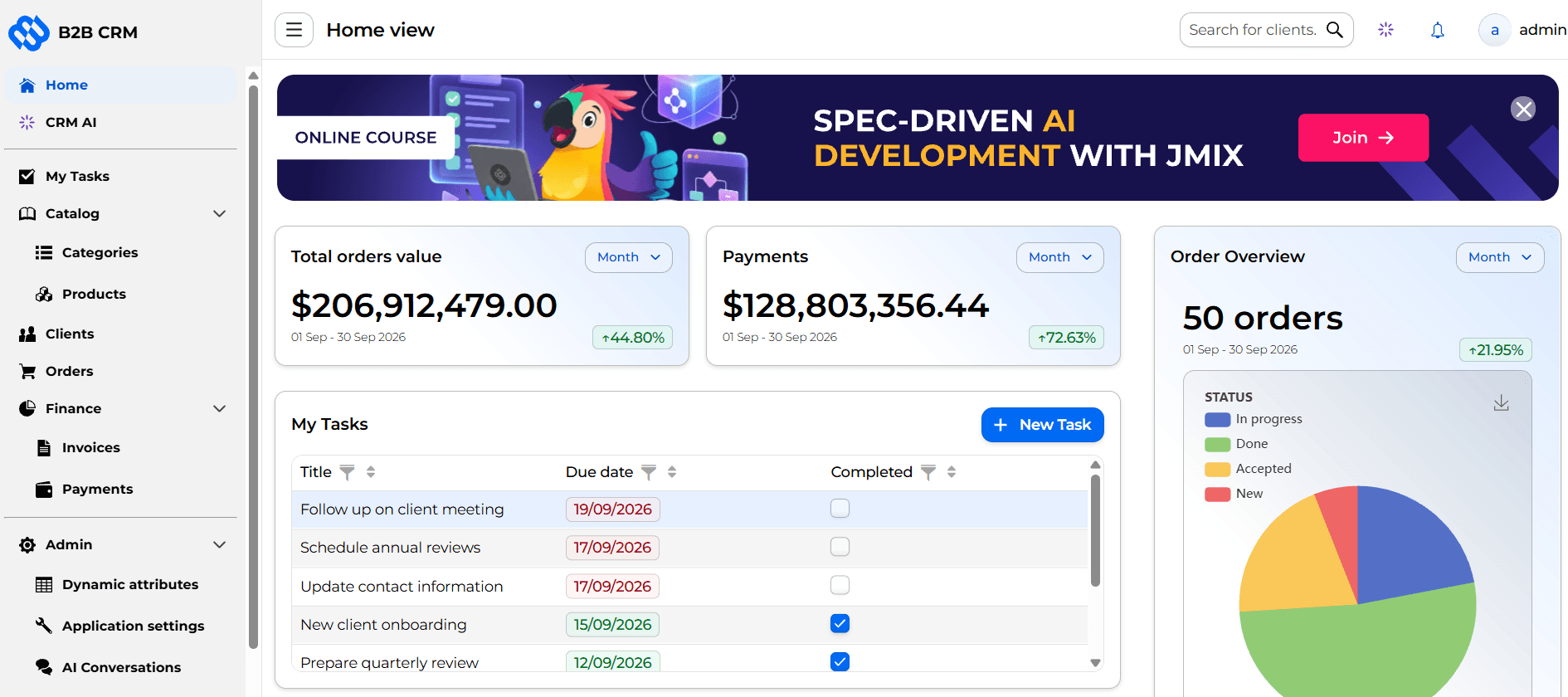
Today, there’s no need to build an enterprise CRM entirely from scratch. A free, open-source B2B CRM demo application built with Jmix is a solid foundation to start from. Built with Java and Spring Boot, it follows real production patterns. It has a complete domain model, built-in security, business processes, and an integrated AI assistant, not just a handful of disconnected CRUD screens.
It isn’t meant to be dropped into production as-is. What it offers is exactly what a foundation should: a starting point a company can adapt into its own enterprise CRM.
A team can adapt the existing data model to its own domain, extend the business logic, integrate corporate systems, and implement its own AI scenarios instead of starting from the ground up.
An overview of the application’s features and how to get started with it is available on the open-source B2B CRM page.
The same governed, permission-aware approach behind the CRM’s AI assistant isn’t limited to CRM data. It applies to other business domains too. Our two-part tutorial on building an AI agent for warehouse operations walks through exactly that: Part 1 explains the basics of tool calling and shows how an agent can work with application data through read-only operations. Part 2 goes further into write operations, security, authentication, validation, and metadata-aware AI scenarios.
How Long Does Development Take?
As a general estimate for projects built on a platform like Jmix, with ready-made components and AI-assisted development, an architectural assessment usually takes one to two weeks, and a working prototype can be built in two or three days. A first production-ready CRM for a single business area typically takes two to five months. If the project spans several departments or regions and includes a complex access model and extensive integrations, the timeline extends to eight to ten months or more, which lines up with Forrester’s survey finding that most enterprise CRM deployments take six months to a year.
These estimates already assume AI-assisted development, not the traditional manual process. That’s a large part of why they’re achievable at all.
In the traditional model, requirements moved sequentially: from a business analyst to developers, then to testing, and finally to release, with each handoff adding delay. That sequence looks different today. A business analyst can prepare a technical specification that AI turns into an initial implementation. Developers spend less time on standard functionality and more on business logic. Parts of quality assurance and testing are automated too, so a task moves from idea to working result with fewer manual handoffs, often as full-stack work handled by a single Java team.
For well-defined, repeatable coding tasks specifically, that speedup is measurable: in a controlled study, developers using GitHub Copilot completed a standard coding task 55% faster than developers without it. That’s part of why project estimates increasingly depend not on the amount of code to be written, but on the engineering complexity of the system itself.
How Much Does Development Cost?
Once the timeline is clear, cost is the next practical question. And the answer has less to do with the choice of language than with how the platform is licensed.
Salesforce and most low-code platforms charge by usage: per user, often combined with runtime or platform fees that scale as the application grows. That’s the mechanism behind the Salesforce numbers discussed earlier, where a base enterprise implementation runs $150,000 to $500,000, with audit and AI features adding further costs on top for as long as the system runs. Mendix, one of the better-known low-code platforms, prices similarly. Pro and Enterprise editions run $1,250 to $1,675 a month, billed annually. OutSystems sits well above that, with enterprise programs commonly reported in the $250,000 to over $1 million a year range, on top of a minimum annual license in the tens of thousands.
A Java platform like Jmix is licensed differently: per developer, not per user or per deployment, with no separate fee for the people who end up using the application. Its published tiers run from free (Community edition) to around $1,930 per developer a year for the most advanced one. For a CRM specifically, the relevant tier is Enterprise, built for B2B and B2G applications, at $1,449 per developer a year: a five-person team costs roughly $7,000 a year in licensing, whether the CRM has 50 users or 5,000.


Over a short pilot, these numbers can look similar. Over the five-to-ten-year lifespan most enterprise CRMs actually have, the gap between a flat, developer-based license and a fee that grows with every new user and every year of runtime becomes the real driver of total cost of ownership, not the choice of language.
On Your Own or With a Partner?
Timeline and cost depend on one more variable: who actually builds the system, and how that process is organized.
A key question is whether to build the system with an internal team or work with an external technology partner.
An internal team building on a platform like Jmix already has what it needs: the tech stack, the AI-assisted tooling, and a foundation to start from, as described above. The remaining question is really about capacity and experience with the platform itself.
Where that’s missing, the alternative isn’t to start over with a generic contractor. Jmix’s own development team offers a few ways to close the gap: turn-key development of the CRM, augmenting an existing team with engineers who already know the platform, or training an internal team to get up to speed on the platform, including its AI-assisted tooling. Either way, the company still ends up with a system it owns outright, built around its own requirements, without carrying the cost of building that platform expertise in-house from scratch.
Conclusion
Building an enterprise CRM today is not only about choosing the right technologies. It’s also about deciding whether to buy or build, how the system should be built, and who should build it. For most enterprise organizations, the key priorities are long-term manageability, the ability to integrate AI safely, continued control over the architecture, and reduced dependence on a single technology vendor.
None of that has to be an abstract exercise. The timelines, costs, and team models described above give a CTO a concrete starting point for planning a project like this, rather than guessing at it.
Jmix is designed to address these requirements. The open-source platform and free B2B CRM demo application provide a ready-made foundation, letting teams build their own AI-powered enterprise CRM in Java without starting from scratch.


