




Every company has a vast amount of internal data: knowledge bases, documents, reference materials, and more. Managing it all is time-consuming. So why not let artificial intelligence guide the way?
RAG technology connects LLMs with corporate data, enabling companies to automate technical support, onboarding for new employees and customers, and document analytics. Naturally, this raises the question: how can RAG be implemented while meeting corporate security standards?
In this article, we will explore RAG systems in detail: understand how to keep control over data and architecture when building RAG systems, show how the Jmix platform can help with it, and walk through a real-world example - Jmix AI Assistant.
How AI Automates Work with Corporate Knowledge
In most companies, corporate knowledge is spread across multiple documents and systems - from EDMS, CRM, and ERP to data repositories and technical documentation. With no single point of access, employees often spend more time searching for information than actually using it.
For example, a manager needs to prepare a client report. Deal history is stored in the CRM, contracts and acceptance certificates are stored in the EDMS, and the latest agreements are recorded in meeting notes in the corporate cloud. To get the full picture, the manager has to open each system, find the right documents, analyze the information, and consolidate it into a single table. This can take hours, and at scale, this fragmentation directly increases the cost of day-to-day operations.
Artificial intelligence can handle this kind of task in just a few minutes. Search, summarization, and analysis are among the most common AI automation scenarios.
How can this be done? For large corporate knowledge bases, RAG is often the most practical approach.
What Is RAG and How Does It Work?
Retrieval-Augmented Generation, or RAG, is a technology that connects a corporate knowledge base with a large language model.
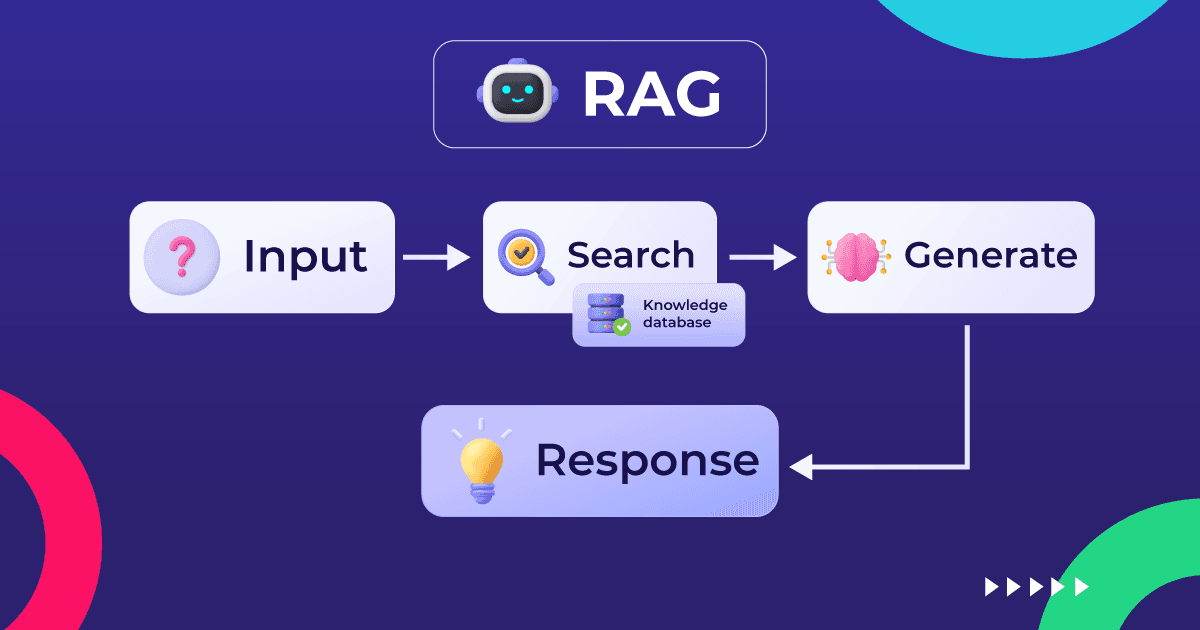
Documents are split into fragments, converted into numerical vector representations, and loaded into a specialized vector database. This allows the system to search for information not by exact keywords, but by the meaning of the query. It finds the fragments that are most relevant in context, even when the wording in the document differs from the wording of the question.
For users, it looks like a familiar chat with an AI model, where they can ask questions in free form. For each request, the system retrieves relevant fragments from the database and passes them to the model. As a result, the answer is generated based on up-to-date corporate materials rather than the model’s general knowledge.
What Alternatives Are There to RAG?
RAG is not the only way to automate work with corporate data using AI. However, for this particular task, the alternatives have their own drawbacks.
Fine-tuning the model
Every time the knowledge base is updated, the model has to be fine-tuned and its behavior adjusted. This is too expensive, as it requires both time and expertise. In RAG systems, it is enough to upload new documents to the database and convert them into vector representations, or embeddings. These make it possible to find the most relevant fragments in the database based on semantic similarity and pass them to the language model as context for the answer.
Passing the entire knowledge base into the context
With each request, all documents are passed to the model in full - in other words, added to the beginning of each conversation as part of the prompt. The main disadvantages are limited context length, rapid token consumption, and the risk that, without relevance-ranking tools, the model may extract information that is not the best match for the query.
Why RAG outperforms these alternatives:
Flexibility
The database is updated independently of the language model. A new document will be taken into account when preparing answers as soon as it is added to the vector database.
Cost efficiency
Only the relevant fragment is passed into the context, not the entire document collection. This significantly reduces token consumption.
Transparency
The answer is based on a specific source that can always be verified. This is different from the output of a fine-tuned model, where it is impossible to trace where a particular statement came from.

Use Cases for RAG Technology in Business
RAG systems help optimize work across a variety of use cases and deliver a clear business impact. Let’s look at several automation examples.
1. A personal assistant that helps users navigate their work context, find the right document, and clarify details of corporate regulations and procedures
According to analysts’ estimates, RAG systems can increase productivity by around 42% and reduce information search time by 95%. Over the course of a month, each employee can save dozens of hours. For a business, this means higher productivity while keeping payroll costs at the same level. RAG systems also help remove bottlenecks in processes where decisions depend on expert knowledge: past orders, internal standards, issue history, and so on.
2. First-line technical support based on the product knowledge base
One of the clearest business metrics is the percentage of requests resolved without operator involvement. By increasing this number, RAG systems allow companies to redistribute the workload among specialists, focus more attention on complex cases, and improve customer loyalty.
3. Onboarding new employees
A company’s onboarding costs depend on how quickly new employees can complete training and reach full productivity. RAG systems help them understand work processes and adapt faster. They also reduce the workload on specialists who act as mentors.
4. Document analysis: contracts, service-level agreements, regulatory requirements, and so on
When documents are analyzed, the final decision remains with the employee, but RAG systems help reduce errors caused by large volumes of information. As a result, businesses can lower the risk of fines and other expenses.
Why Security Is Important When Using RAG Systems
When building enterprise-scale RAG systems, it is important to keep security standards in mind. Using cloud services and public AI models involves several risks.
Data transfer outside the corporate perimeter
When public models are used, customer personal data, trade secrets, and other internal information are processed on the provider’s side. This creates a risk of data leakage. Companies need to prevent situations where users outside the organization can access information from a client’s knowledge base.
Difficulty in managing data access rights
Public RAG systems do not take corporate security policies into account. Data access must be configured based on user roles, which is not always possible. For example, a sales manager should not have access to confidential information about projects they are not responsible for.
Dependence on an external provider
A company cannot control the availability of a third-party resource, its pricing policy, or its development roadmap. Its influence is limited to the SLA. If the provider raises the price of a plan or reduces the number of available requests, the company will have to adjust its processes accordingly.
Violation of regulatory requirements
For industries with strict data storage requirements, such as the government or financial sector, transferring data to an external provider may be prohibited. Data protection requirements are usually also applied at the country or regional level.
To eliminate these risks, RAG systems must be deployed within the corporate perimeter, with data access managed according to security policies, user roles, and other restrictions.
How to Ensure the Security of RAG Systems
To make RAG systems compliant with corporate standards, several components are required:
- Hosting the database on the company's own servers (on premises) or in a private cloud
- Deploying the AI model on the company’s own infrastructure using self-hosted models
- Integrating with identity management systems and enforcing access rights according to the corporate role model
- Auditing requests, storing logs, tracing sources, and monitoring activity
Taken together, these measures help maintain control over data and ensure compliance with internal and regulatory requirements.
What Is Needed to Build RAG Systems
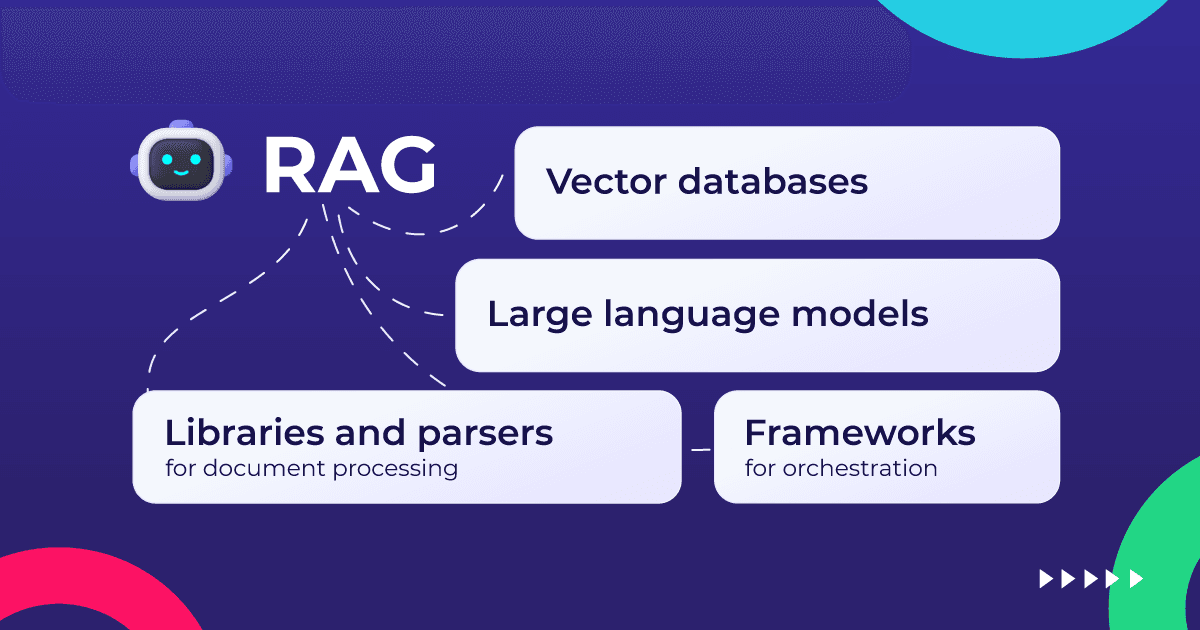
Let’s look at the main components of RAG systems and the tools required to build them.
Vector Databases
Vector databases store data in a format suitable for semantic search. Common examples include pgvector, Qdrant, Chroma, and Pinecone.
Large Language Models
Large language models use the information fragments retrieved from the database to generate a coherent answer in natural language. Among the most widely used public LLMs are models from OpenAI, Anthropic, and Google. Common open-source examples include Gemma, Qwen, Kimi, and Mistral.
Libraries and Parsers for Document Processing
These tools extract text from files in different formats - PDF, Word documents, spreadsheets - and convert it into a format suitable for loading into a knowledge base. Examples include Tesseract and Apache Tika.
Frameworks for orchestration
RAG pipelines are built using orchestration frameworks and tools that receive a request, query the knowledge base, build the context, and pass it to the LLM. In an enterprise environment, tools such as LangChain, Spring AI, and n8n can be used for this.
A Platform for Developing Enterprise Systems
RAG components need to be turned into a complete application with a user interface, deployed within the corporate perimeter. Standard development tools can be used for this. At the same time, as with any enterprise IT project, speed of delivery, lower development costs, and technological independence are important. This is where platforms such as Jmix come in.
How the Jmix Platform Helps Build RAG Applications
Jmix is an open-source Java platform for building enterprise systems.
It offers:
- A ready-made modular architecture for enterprise solutions
- Tools for visual development and efficient coding
- Pluggable business components, security mechanisms, and integration capabilities
- AI tools that help developers learn the platform and work more effectively with code agents
Jmix provides a reliable foundation for enterprise applications, ensures technological independence, and helps accelerate development and improve team productivity.
When developing RAG systems, Jmix provides the following capabilities:
Centralized Management of the Knowledge Base and Metadata
To use RAG with business-critical documents, simply uploading files to a knowledge base is not enough. Documents also need to be enriched with metadata: owner, department, data type, confidentiality level, status, version, and access rules. If you do not want the discount history of a key customer to become known across the entire company, this is exactly the kind of case where metadata matters. Jmix provides a ready-made application layer for creating and managing metadata for searchable objects, which is then used when querying the knowledge base.
Integration Layer Between AI and Corporate Systems
Jmix can act as a backend layer between a RAG service, an LLM, a vector database, and corporate systems such as DMS, ERP, CRM, Service Desk, internal databases, and file storage systems. The platform helps set up data exchange through APIs and integrate AI scenarios into the company’s existing IT landscape. At the same time, the solution is not tied to a specific AI provider, allowing teams to work with both frontier models and open-source models depending on their infrastructure, security, and business requirements.
Action Auditing and Protection of Legally Significant Documents
Jmix helps implement an audit trail for user actions when working with business-critical documents: who uploaded a document, who changed its metadata, who submitted it for indexing, who approved it for publication, and who used it in a RAG scenario. This is especially important for legally significant documents, regulations, contracts, financial terms, and customer agreements. With Jmix, companies can restrict unauthorized changes, record the history of operations, and maintain control over documents used by AI to generate answers.
Data Lifecycle Management
Jmix can be used to implement processes for uploading, reviewing, approving, publishing, updating, and archiving documents. The platform’s BPM capabilities make it possible to embed human-in-the-loop scenarios, such as expert review, publication approval, and handling disputed materials. This helps keep the knowledge base up to date instead of turning RAG into a generator of answers based on outdated regulations.
Built-In Admin Panel and Data Quality Control Tools
Jmix makes it possible to quickly create administrative interfaces for managing knowledge sources, metadata, indexing statuses, document versions, and access rules. Through these interfaces, users can track what data is added to the knowledge base, which documents require review, and which sources need updating. This gives the business control over data quality, which directly affects the quality of AI-generated answers.
User Interface
With Jmix, an AI interface can be embedded directly into a business application: a chat, knowledge base search, an answer card with sources, a quality assessment form, and escalation to an expert. Users work with AI not in a separate experimental bot, but within a familiar corporate process. This makes RAG more practical for real operational work.
Deployment Within Corporate Infrastructure
Jmix applications can be deployed on company servers or in a corporate cloud. This is important for organizations that cannot transfer documents and sensitive data to external AI services. Jmix is suitable for architectures with a private cloud, on-premises deployment, a self-hosted vector database, and corporate-approved LLMs.

Example of a RAG Application Based on Jmix: Jmix AI Assistant
To help developers who are getting started with Jmix learn the platform faster, we developed Jmix AI Assistant.
Previously, when developers encountered difficulties, they had to search for answers in documentation, training materials, or forum discussions. This took a lot of time. Code examples, step-by-step instructions, and explanations of typical scenarios were not always immediately available.
The solution was a RAG application based on a specialized Jmix knowledge base. The beta version was released in July 2024, followed by the official release in 2025.
Jmix AI Assistant uses the following information sources:
- Documentation
- Training materials
- Code examples with typical solutions
- Forum discussions
Users can work with Jmix AI Assistant through the web interface on the platform website, as well as directly inside IntelliJ IDEA or OpenIDE.
Example question and answer:
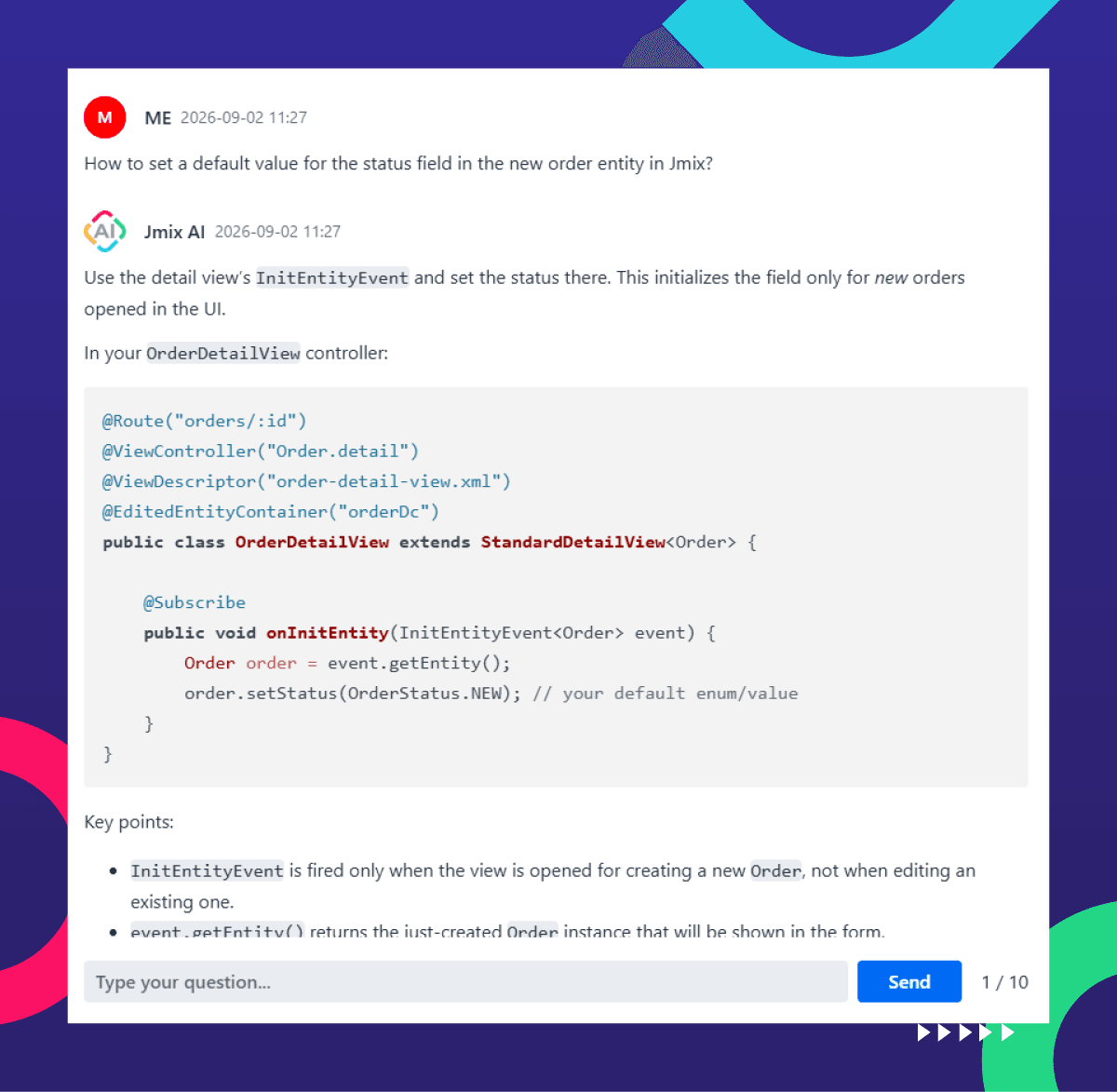
With Jmix AI Assistant, developers can get instant answers directly inside the IDE, without contacting support or searching through the documentation.
User support costs have been reduced by 50%. Onboarding is now approximately twice as fast: today, it takes a Java developer 3–4 days to get started with Jmix, while a developer with a background in other languages needs 2–3 weeks.
Where to Start with Building RAG: Practical Steps
After understanding how corporate RAG systems work, what they can be used for, and how they are developed, the next question is how to approach implementation in practice. A consistent five-step approach can help bring an AI initiative to life:
- Define a pilot scenario and knowledge sources.
- Assess security and infrastructure requirements.
- Choose a platform with ready-made tools for building RAG.
- Launch a prototype and measure the results.
- Scale the solution.
RAG systems are an approach to corporate AI automation with proven business value, clear use cases, and a well-established implementation pattern. The value of such a solution comes from combining the capabilities of language models with deep integration into the specifics of a particular company, while meeting corporate security standards. Jmix makes it possible to implement RAG systems quickly and predictably by providing a development platform with ready-made mechanisms for security, user action control, and scaling.


