




AI IDE plugins remain useful for local productivity and fast coding assistance. But for many teams building large and evolving systems, the bigger question in 2026 is whether plugins alone are enough for sustainable AI-driven development.
This article explores where AI coding assistants are genuinely strong, where architectural and workflow limitations begin to appear, and why the market is gradually shifting toward agentic and platform-level AI workflows.
You will also see how engineering teams evaluate AI plugins in real production environments, what operational costs often remain underestimated, and how modern AI development increasingly extends beyond the IDE itself.
Key Takeaways
- AI IDE plugins are strong for local productivity and micro-tasks.
- AI coding assistants often struggle with repository-scale context and long engineering workflows.
- Enterprise AI development increasingly requires agentic and platform-level workflows.
- Teams should evaluate AI tools not only by generation quality, but also by governance, reproducibility, and operational stability.
- Mature engineering organizations increasingly combine IDE plugins, CLI agents, and API/platform integrations.
«It doesn’t always understand the full structure of larger codebases. In bigger projects, the suggestions can feel a bit disconnected.» (Verified Reviewer, Capterra).
«Chat feels bolted-on rather than deeply native; inconsistent UX across project types.» (HN commentator, Hacker News, discussion about JetBrains AI Assistant).
«First thing I do with any JetBrains IDE is kill that AI assistant. I’m paid to think.» (HN commentator, Hacker News, discussion about JetBrains AI Assistant).
«JB have been and still are so ahead in ergonomics that I still cannot imagine going back to VS. I just question their priorities.» (HN commentator, Hacker News, discussion about JetBrains AI Assistant).
That is a strong take, but the same discussion includes the opposite view. So, the picture is not black and white.
When GitHub Copilot launched in 2021, it felt like an instant productivity jump: open your editor, install a plugin, get autocomplete, and sometimes whole blocks of usable code.
That was an important phase. Plugins made AI mainstream. Millions of downloads, billions of tokens, and countless engineer-hours saved (or wasted). The market responded exactly as expected: dozens of lookalike plugins appeared, even just in the IntelliJ ecosystem.
However, in 2026, the question is no longer whether plugins help at all. They do, and that is not in dispute.
The real question is whether they can support a long-term engineering strategy for teams building large, real-world, constantly evolving systems.
Short answer: plugins work well as an entry layer and local accelerator, but are usually not suited as the primary layer for complex AI-driven development.


What Is an AI IDE Plugin?
An AI IDE plugin is a software extension integrated into a development environment that provides AI-powered coding assistance directly inside the editor.
Typical capabilities include autocomplete, code generation, refactoring suggestions, documentation help, bug fixing assistance, and conversational coding support.
What We Mean by «AI-Driven Development»
To avoid talking past each other, here is the working definition. In this article, AI-driven development is not just code generation in an editor; it is a tool’s ability to reliably handle the full task cycle:
- Understand task context at repository scale
- Make changes across multiple modules, not just one file
- Verify results via commands, tests, and tooling
- Integrate changes into a real git workflow
- Repeat this predictably across a team
If a tool is only strong within a single file or a single chat thread, it can still be useful, but it does not yet function as a system-level development layer.
A Three-Layer Model of AI Tooling
| Layer | Purpose | Typical | Capabilities |
|---|---|---|---|
| Layer 1 | IDE Plugin | Local developer productivity | Autocomplete, local edits, AI chat |
| Layer 2 | CLI / Agent | Repository-scale execution | Multi-file changes, tests, terminal workflows |
| Layer 3 | API / Platform | Team-level governance | CI/CD integration, policies, auditability, metrics |
Where Plugins Are Actually Strong
It is easy to focus on weaknesses, and we will get there. But first, the real strengths:
- Low barrier to entry: setup in minutes, with no process rewrite.
- Native developer experience: everything stays inside the familiar IDE.
- Fast local wins: boilerplate, comments, simple fixes, language translation.
- Cheap pilot: easy to test value with a small slice of project work.
- Local model support is often available: sometimes lower quality, but frequently better on cost and data control.
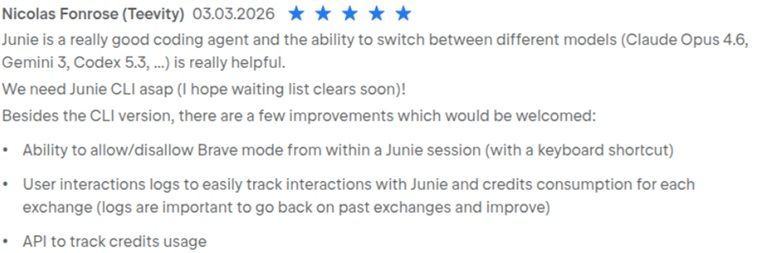
«The quality of results is probably language dependent. I was able to use Junie to do a bunch of Java/Kotlin tasks, and it worked very well.» (HN commentator, Hacker News, discussion about JetBrains AI Assistant).
For individual productivity, these benefits are hard to argue with.
The trouble starts when a plugin is expected to behave like an agent that can own an end-to-end task and deliver a verifiable result.
Where the Limits Are
A plugin runs inside IDE architecture: UI lifecycle, extension platform constraints, editor-specific APIs, permission models, and local indexing performance.
In complex scenarios, this repeatedly leads to the same effects:
- Context gathering is partial or expensive in large repositories.
- Outside-editor actions (terminal, CI, external services) rely on extra glue layers.
- Behavior varies across IDEs, IDE versions, and plugin versions.
- Integration regressions become more likely after updates, even when the model itself improves.
Important nuance: the point is not that «plugins can do nothing». Many plugins can run terminal commands, edit multiple files, and switch models.
This is one reason Anthropic positioned Claude Code as CLI-first. Boris Cherny from Anthropic publicly explained that repository-scale workflows and terminal execution become easier to manage outside traditional IDE plugin constraints.
Why It Hurts More in Teams than for Solo Developers
On a personal project, you can absorb a lot of friction. In a team setting, different requirements kick in:
- Reproducibility
- Shared practices
- Risk control
- Governed updates
- Quality observability
And this is where fragmentation shows up:
- Part of the team uses VS Code
- Part uses the IntelliJ platform
- Part uses Neovim / Emacs
- Everyone has different plugins, often even within the same IDE
What you get is not «one AI tool», but a patchwork of heterogeneous clients with different capabilities, limits, and stability profiles.
If it works on one developer’s machine that does not automatically make it a reliable team standard.
Have We Counted the Full Cost?
License price is the visible line item. In real operations, a second bill appears, and teams often undercount it:
- Compatibility with IDE versions and enterprise update policies
- Incident debugging after updates
- Security policy setup and maintenance
- Training by IDE and role
- UX divergence that complicates internal documentation
These costs may not look dramatic in month one. Over quarters, they can start eating into the value created by the tool itself.
What Plugin Users Say, and How to Read It
Reviews are not scientific proof on their own, but they are useful as an indicator of repeated expectation failures.

What tends to repeat in reviews and discussions
| Pattern | What tends to repeat in reviews and discussions |
|---|---|
| «Great on small tasks» | Users often praise speed and convenience at function/file scope. |
| «Loses the plot on large codebases» | In monorepos and complex architectures, complaints about context loss and irrelevant suggestions are more frequent. |
| «UX and integration matter as much as the model» | A significant share of complaints is about IDE integration quality, not raw model intelligence. As plugin builders, we in Haulmont know this firsthand: building and sustainably supporting a high-quality plugin is hard even for a single IDE. |
| «Control matters, not just generation» | As teams mature, verifiability, traceability, and repeatability become more important. |
That is why judging a tool only by «how pretty the suggestions look» can be a red herring.
Real Incidents Matter More Than Marketing Claims
In late March 2026, users noticed Copilot injecting promo-style messages into pull request text (including references to Raycast), which was perceived as advertising in PR workflows.
GitHub publicly described it as a programming logic issue in coding agent tips and removed those tips from pull request comments. The feature was rolled back, but trust damage remained.
The practical takeaway for teams: evaluate not only model quality, but also the platform incentives behind the interface, plus your degree of control (policies, settings, and the ability to disable controversial Behavior quickly).
Where the Market Is Moving
Over the past two years, the biggest shift has not been «smarter autocomplete», but the execution model.
Adoption is growing for approaches where AI operates as an agent:
- Works over whole repositories, sometimes multiple repositories
- Runs checks and commands
- Integrates into CI/CD and review workflows
- Acts as an execution engine, not just a text generator
That is why interest in editor-native AI IDEs, CLI agents, and platform/API approaches has increased.
This does not eliminate plugins. It changes where they sit in the stack.
JetBrains itself is also signaling this transition, positioning ACP support as a first-class direction for future IDE workflows.
A Practical Decision Framework for Teams
From this point on, use the three-layer model defined above.
Simple operating principle:
- Layer 1 speeds up individual developer work
- Layer 2 covers repository-level engineering loops
- Layer 3 provides team-level control, repeatability, and process integration
In this setup, the plugin remains important, but it is no longer the architectural center of gravity.



When a Plugin as the Primary Layer Is Still Fine
There are cases where that is enough:
- Small team
- The team mostly uses the same IDE
- Short iteration cycles
- Low process formalization requirements
If these conditions match your reality, a plugin can be a practical choice rather than a temporary crutch.
Problems usually start as scale and predictability requirements increase.
A Minimal Migration Plan without Breaking Things
If your team already relies on plugins but wants a more resilient architecture, no big-bang rewrite is needed. A gradual, controlled migration can look like this:
- Establish a baseline: where the plugin creates clear value vs. where it creates noise.
- Add one CLI/agent flow for tasks following «change → verify → commit».
- Move one or two repeatable scenarios into API/CI integrations.
- Re-evaluate after 4–6 weeks using cycle time, rollback count, and review quality.
That is usually enough to identify where plugins should stay and where their role should be reduced.
Bottom Line
An IDE plugin is a strong interface layer and a great entry point.
But as the foundation of AI development strategy for complex team projects, it often hits an architectural ceiling.
If the goal is sustained engineering productivity gains, the stronger pattern is:
- Usable AI in the editor
- An agent layer outside the editor
- API-first integrations into team workflows
The difference is not cosmetic. It is about how much control, reproducibility, and scale you can sustain.
For Jmix specifically, this means Jmix Studio remains a core Layer 1 productivity surface for framework-aware enterprise Java development in IntelliJ IDEA: project scaffolding, entity/UI designers, add-on workflows, and migration support.
As coding agents become more capable, the role of Jmix Studio increasingly shifts from pure code generation toward architectural guidance, framework correctness, and helping both developers and AI agents follow Jmix conventions more predictably.


FAQ
Are AI IDE plugins enough for enterprise software development?
Usually not by themselves. Large engineering organizations often also require repository-scale agents, CI/CD integrations, governance controls, and reproducible workflows.
What is the difference between an AI IDE plugin and an AI agent?
An AI IDE plugin mainly operates inside the editor and focuses on local coding tasks. An AI agent typically operates across repositories, terminal workflows, tests, and automation pipelines.
Why are AI coding assistants weaker on large codebases?
Large repositories create context-management challenges. AI plugins may struggle with architectural understanding, repository-wide dependencies, and long multi-step workflows.
Will AI plugins disappear?
Probably not. IDE plugins remain extremely useful as Layer 1 productivity tools. The market trend suggests they will become part of broader multi-layer AI development ecosystems.
Sources
- JetBrains AI Assistant - JetBrains Marketplace Reviews
- JetBrains AI Assistant panned in JetBrains Marketplace - InfoWorld
- JetBrains defends removal of negative reviews for unpopular AI Assistant - DevClass
- GitHub backs down
- Martin Woodward (GitHub): statement about programming logic issue and removing tips
- GitHub Copilot Reviews - G2
- Tabnine Reviews - G2
- Amazon Q Developer Reviews and Ratings - Gartner Peer Insights
- Supermaven - Visual Studio Marketplace
- Continue Documentation
- Hacker News discussion: JetBrains and AI Assistant user feedback
- Hacker News: quoted deleted review excerpt («bolted-on» UX quote)
- GitHub Copilot Reviews - Capterra
- Claude Code in 30 minutes (Boris Cherny, Anthropic)
- Claude Code Docs
- JetBrains talk/video mentioning ACP support direction


