




I'm a Jmix developer. Enterprise Java, Vaadin screens, security roles - the usual stuff.
At some point I caught myself wondering: everyone's out there vibe-coding React apps and Python scripts in minutes. But what about Jmix? Is it something LLMs can handle — and if so, how well?
I wanted to quit after the first week. Out of 120 generated classes, only a couple dozen made it to production. LLMs confidently invented APIs that didn't exist, mixed up Jmix versions, and insisted on using EntityManager where it didn’t belong. Infuriating. Things got better by the second week: I was only throwing out every fifth file instead of everything. By week three, I barely had to redo anything.
What made the difference? Configuration. I'll show you how to set it up.
Key Problem: "Done" by LLM Doesn't Mean "Working"
LLMs love to declare victory as soon as code compiles. Like "Done!", time to celebrate =) Sometimes, if their conscience bothers them (which rarely happens for now and mainly with the most expensive models), they might think to run tests. And you get a response like "done, waiting for review, everything works / everything fixed". Yeah, right.
In my first month of experiments, the errors roughly fell into three groups. About a quarter were compile-time issues — missing imports, type typos — small things LLMs handle easily. Another quarter were startup failures, where the application wouldn’t start: Spring failed to initialise, Liquibase broke on migrations. These are usually straightforward to fix by having the agent run the app and inspect the logs.
The remaining issues showed up at runtime: opening a screen and hitting a NullPointerException, clicking a button and nothing happening, saving an entity and ending up with broken data. These take more effort and attention.Typical scenario: LLM wrote a view (e.g. screen / page), code compiled, application started. "Done!!". You open the screen and hit an Exception. Or the button doesn't work. Or data doesn't save. Then the exhausting cycle kicks in: test, explain, LLM fixes, and test again. TIME AND TIME AGAIN.
All that speed disappears into this cycle. Fortunately, I found an efficient way to break this exhausting circle.
Best models to work with Jmix
There are many different kinds of LLMs now, and their quality can vary significantly depending on the task. Jmix is no exception, so I put together my own rating as it stands at the beginning of 2026.
Top tier (Claude Opus, Gemini Pro, Codex 5.2). Work almost without context. Know Jmix 2.x, understand Vaadin Flow, and rarely hallucinate. You can work with them productively.
Mid-tier (Claude Sonnet, GPT-4/5, Gemini Flash). Know the basics but make things up. Might use @GeneratedValue instead of @JmixGeneratedValue, or forget @InstanceName. With good context, they work reasonably well.
Cheap and local (Codestral, Qwen, Llama 3). Hallucinate constantly. The code looks convincing — production-ready until you actually run it.
Here is an example for prompt: "create entity Customer with fields name, email":
- Opus: @JmixEntity + @Entity + UUID + @Version + @InstanceName → works
- GPT: @Entity + @GeneratedValue (without @JmixEntity) → compiles, doesn't work
Why doesn't the GPT version work? Jmix doesn't see the entity without @JmixEntity: it won't appear in UI, DataManager won't find it, Studio won't generate screens. Code compiles, app starts, but the entity is like it doesn't exist. Classic runtime error that you catch after an hour of debugging.
Context files help everyone: top models avoid such errors, and weaker ones at least work somehow.
Platforms: Where to Run the Model
Right now, all platforms support different vendors - you can use Opus in Cursor or Amazon Bedrock in Claude Code. So, choose by convenience, not by model.
| Platform | For whom | Pros | Cons | Pricing model |
|---|---|---|---|---|
| Cursor | VS Code users | Sub-agents, multi-model evaluation, automatic context | No integration with Jmix Studio | Ultimate ≈ $200/month. Includes a total of ~$400 you can burn across different AI provider APIs |
| Claude Code | Any editor | Terminal-based agent, 5–10 parallel agents | Loses context in long sessions | Max x20 subscription ≈ $200/month, essentially unlimited vibe-coding |
| Junie | IntelliJ IDEA users | Native integration, sees full project structure | Less proactive than Cursor | Similar to Cursor (or more expensive), but for IDEA-based editors |
| Continue | Any editor | Data stays local, highly configurable | IMO tool calling is not well optimised | Subscription-based or free (with third-party providers) |
I tried them all. Settled on Claude Code with Max subscription: you can vibe-code without worrying about limits, run parallel agents (multiple real sessions, not sub-agents), don't count tokens at all. For NDA projects I use Continue with local models, but there you have to monitor more closely.
Alright, let's say the platform is chosen and the model is connected. But remember that annoying cycle: opened screen, saw error, explained to agent, got fix, checked, error again? Platform alone doesn't break that cycle. You need one more piece of the puzzle.
MCP: Hands for the Agent
MCP (Model Context Protocol) is like giving AI hands. Without it, LLM only generates text and hopes you'll check yourself. With MCP, the agent can dig into the IDE to look at errors, open a browser, and click buttons.
I used two MCP servers for Jmix.
IDEA MCP is the agent's eyes in the IDE. It sees not just compilation but Jmix Studio warnings: untranslated messages, broken XML references, fetch plan issues. Compiler lets those slide, Jmix Studio catches them. Saved me tons of debugging time, though you often have to push the LLM to actually use IDEA for static analysis. The agent often won't notice that, for example, our new enum isn't localized or that using certain beans is excessive when there's a simpler way. But Jmix Studio can tell all of this.
Playwright MCP gives the agent a browser. It opens localhost:8080, logs in as admin/admin, and clicks through screens. Sees that a button doesn't work or form doesn't save data - and goes to fix it himself.
Check this out:
WITHOUT MCP:
- Agent wrote view
- Compiled -"done!"
- You open it - error
- You explain what's wrong
- Agent fixes
- Repeat steps 3-5
WITH MCP:
- Agent wrote view
- Checked IDEA MCP - found warnings - fixed
- Opened Playwright - clicked around - found bug - fixed
- Gives you working code
When the agent with Playwright first found a bug in a form on its own - without my hint, just clicked around and found it - my jaw literally dropped. This is it. This is how it should work. Since then, the agent has been finding most runtime bugs, not me.
Disclaimer
Everything here is written for Claude Code. It is what I use and, in my opinion, it's currently the most capable agentic platform for Jmix development.
That said, other platforms can do the same things, you'll just need to adapt. CLAUDE.md becomes AGENTS.md in Codex, MCP server setup looks a bit different in Cursor, et cetera. The concepts are the same, the config files aren't.
Step-by-step instruction how to make it work
To be more specific, I have shared the exact instructions on how to make this approach work below.
Install MCP Servers
Setting this up took me three tries. The first time I fat-fingered the JSON and spent 20 minutes debugging syntax errors. The second time I mixed up the npx flags. But the third time, when I saw the agent open a browser on its own and start clicking buttons? That made it all worth it.
We are going to install 3 MCP Servers:
- jetbrains - connection with IntelliJ IDEA: compilation errors, Studio warnings, code navigation
- playwright - browser: open page, click, screenshot, check UI
- context7 (optional) - needed if model doesn't know Jmix well (Sonnet, local models), will “google jmix things” through it
You can configure it in ~/.claude/settings.json - all servers at once:
{
  "mcpServers": {
    "jetbrains": {
      "command": "npx",
      "args": [
        "-y",
        "@jetbrains/mcp-proxy"
      ]
    },
    "playwright": {
      "command": "npx",
      "args": [
        "-y",
        "@playwright/mcp"
      ]
    },
    "context7": {
      "command": "npx",
      "args": [
        "-y",
        "@upstash/context7-mcp"
      ]
    }
  }
}
For IDEA 2025.2+ can use built-in SSE server (without npx):
{
  "mcpServers": {
    "jetbrains": {
      "type": "sse",
      "url": "http://localhost:65520/sse"
    }
  }
}
Alternatively - via CLI (requires Node.js 18+):
node - version  # check you have it

claude mcp add jetbrains -- npx - y @jetbrains/mcp-proxy
claude mcp add playwright -- npx - y @playwright/mcp

# optionally, if model is small and doesn't know Jmix:
claude mcp add context7 -- npx - y @upstash/context7-mcp
Configure IDEA MCP
Once MCP servers are setup some additional configuration within IntelliJ IDEA will be required.
- File → Settings → Tools → MCP Servers
- Add configuration (IDE usually offers a built-in server)
- Or install the "MCP Server" plugin from Marketplace
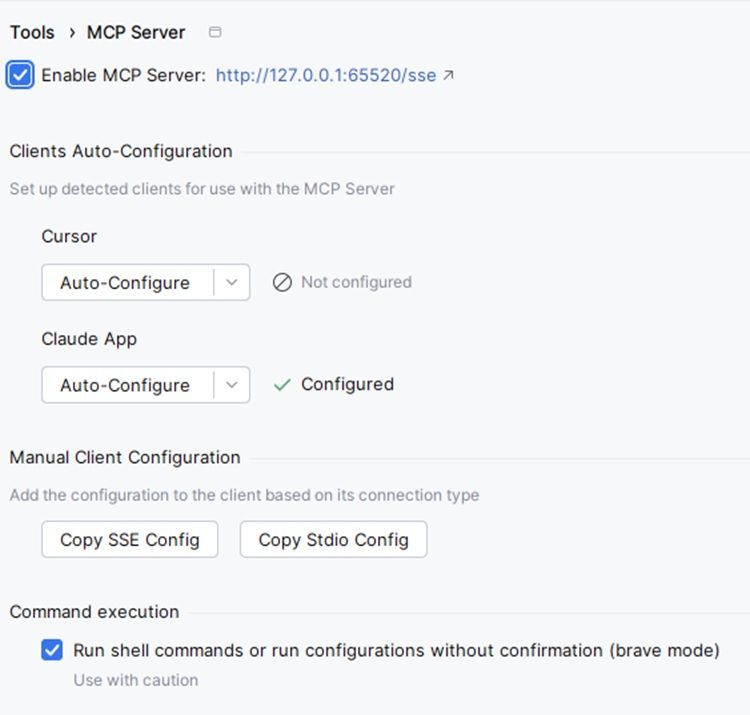
Once all MCP servers are configured, our agent can self-check himself by using IDEA's inspections and use proper project tools (way better than raw bash). And with Playwright MCP, the agent gets browser_navigate, browser_click, browser_screenshot — meaning the LLM can test the UI on its own.
One caveat though: Playwright is slow. 10–20 seconds for a simple click, up to a minute for a form. When I need to iterate fast, I check manually. Playwright runs before commit as a final sanity check.
Setup: Minimum That Works
Create instructions for code Agents
Don't copy the structure from cursor-boilerplate template project that you found in github: you do not need all 15 folders like /agents, /prompts, /skills and other. Don’t try to run for all this strange files like skills, agents, rules and other context neuro-slop files. You actually use maybe 10% of that. Especially, if you just start your “vibe-code carrier”.
AI-README
One context file is enough. Name depends by platform – it can be CLAUDE.md or AGENTS.md or any other .md file. For details, check how does the context file named in your platform.
Minimal CLAUDE.md:
# Project: Jmix 2.x Application

## Role (optional)
You  can describe what your agent is and what does he should be

## Stack
- Java 17, Spring Boot, Vaadin Flow
- Database: HSQLDB (dev), PostgreSQL (prod)
- Run: `./gradlew bootRun` (localhost:8080, admin/admin)

## Rules
- Entity: @JmixEntity + UUID (@JmixGeneratedValue) + @Version + @InstanceName
- Data access: DataManager only (NOT EntityManager)
- DI: constructor injection (no field @Autowired)
- Views: XML descriptor + Java controller pair
- All UI text: msg:// keys, add to ALL locale files

## Forbidden
- Lombok on entities
- Business logic in views
- Edits in frontend/generated/
The model knows what this project is, which rules apply, and what is forbidden. That's enough to start. After a few iterations, you'll naturally extend your “AI-README".md with fixes for common AI mistakes. Don't worry - at the end of the article, I'll share GitHub links with all the CLAUDE.md and RULES.md files that cover 90% of Jmix projects.
Prompt engineering
No need to write a novel, here is a working structure:
Study the project: look at CLAUDE.md, structure, existing entities and views.

Create entity Order with fields:
- customer (link to Customer)
- date (order date)
- total (amount)
- status (enum: NEW, PROCESSING, DONE)

Create list view and detail view for Order.
Add to menu after Customers.
Write unit test for OrderService.

After each change, check via IDEA MCP (get_file_problems).
When view is ready, open in browser via Playwright and check:
- List displays
- Creation works
- Editing saves data

Commit working piece with clear message.
"Write unit test" isn't random here. In fact, TDD with AI is a killer combo. I used to be lazy about writing tests because it took time. Now AI writes them for me, and I ask it to cover everything. Extensive coverage is no longer a luxury; it is the norm.
Why this matters specifically with vibe-coding: the agent in the next iteration might break what was working. Without tests, you may not notice it until changes arrive at production. With tests - agent sees red build itself and fixes it. Now I first ask to write tests for existing code, only then give a task for changes.
Brief recap
Opus 4.5 + Claude Code + Playwright is the "bare minimum" needed for vibe-coding with Jmix. Seriously, nothing else needed to start, everything else is just workflow optimizations and spending less on AI credits. Minimal setup (CLAUDE.md + clone repo) - about 15 minutes. With MCP - around an hour if you haven't configured before. By the end of the day I usually have 5-7 entities, dozen screens, and couple roles. Not a "full-featured CRM" but a foundation you can show and develop.
What's Mandatory
Here are requirements for common Jmix AI-agentic development in my opinion:
- Claude Opus 4.5 - top model, knows Jmix, rarely hallucinates. Can use Sonnet but with good context
- Claude Code - terminal agent, reads/writes files itself, runs commands. Mandatory
- Playwright MCP - agent opens browser and tests UI itself. Catches over half the bugs
- JetBrains MCP - Studio warnings, compilation errors. Recommended, saves debugging time
- AI-README (CLAUDE.md / AGENTS.md) - Dos and don'ts for the agent. Optional unless the LLM keeps making the same mistakes. Opus + React? Not needed. Sonnet + Jmix? Definitely needed.
What's Optional
- rules/, skills/ - folders with detailed instructions. Useful when project is large, but excessive for starting
- Multiple AI-READMEs (.cursorrules, AGENTS.md) - only needed if using different platforms
- RAG/vector databases - for huge codebases, not for starting
- Custom MCPs - GitHub, Sentry, databases - add when needed
- Context7 (@upstash/context7-mcp) - MCP server for searching library documentation. We contributed Jmix support to it. The dumber the model - the more it needs to Google the docs, and Context7 saves here. Excessive for Opus, must-have for local models. Eventually embedding-based search will work even more precisely, but for now Context7 is a working option
Where to Get Files
Everything mentioned in the article is in jmix-agent-guidelines:
- AGENTS.md - an open standard for guiding AI coding agents, used by 60k+ projects. A README for AI: build commands, code style, testing. Everything that any agent needs to work with your codebase. Works with Cursor, Copilot, Codex by default.
- ai-docs/rules/ - detailed rules by topics (entity, views, security)
- ai-docs/skills/ - step-by-step instructions for typical tasks
Copy needed files to your project, adjust for yourself - and go.
Conclusions
AI generates code faster than you. Jmix doesn't let it screw up too much - structure is strict. MCP lets the agent catch its own bugs. When all this works together - it's genuinely great.
Forget "act as senior developer" and other incantations from 2023. With modern models, this is almost unnecessary - often they rewrite the prompt internally themselves (ReAct, Thinking mode). You write what you want to get, the agent does it.
The only place that prompts still matter is when assigning roles to agents. "You're a reviewer, check code for security" or " you're a tester, find edge cases." Here the role formulation affects the result. Otherwise - just say what needs to be done.
When you master the basic setup, you can speed up even more. With good architecture (modules, clear boundaries), run multiple agents in parallel - each works on its own folder. One builds one module, another another module, third writes tests for common API, etc. They don't interfere with each other if boundaries are clear.
Even better through Cursor with sub-agents: The main model becomes an orchestrator, distributes tasks, and collects results. You get a whole team of neural nets with their own roles and workflows. One agent is an architect, another is a coder, and the third is a reviewer. Sounds like sci-fi but actually works.
But this is optimization, not the starting point. First, learn with one agent, then scale.
The approach described above works great for the CRUD, admin panels, prototypes, internal tools, but there are also some limitations where the results can be less positive:
- Complex business logic AI handles it poorly. CRUD, typical operations, yes, easy. But I killed a whole day trying to get Claude to handle discount calculations with an accumulation system. Explained, showed examples, cursed. Claude kept confusing the calculation base and summing the wrong time periods. After 7 iterations I gave up and wrote it myself in two hours. State machines, tricky algorithms - same thing, better by hand (it can handle those too, but it's way less fun).
- Integrations are a separate story. AI doesn't know your specific API, you'll have to explain every endpoint and check every call. Integration with a blood enterprise CRM systems SOAP service? I didn't even try handing that to the agent.
- Legacy without tests – don't touch. Seriously. AI will climb in there and create such chaos you'll be cleaning up for a week. It doesn't understand that this hack from 2015 supports half the business logic. Tests first, then vibe-coding.
Also about teams: AI amplifies the bad things too. If a person doesn't understand the code they're copying - bugs will end up in production. Code review for AI code is mandatory, especially with juniors.
The final concideration is confidentiality: code goes to the cloud. If you're dealing with NDAs or personal data, use either local models or scrub the context clean.


